DevSecOps
- Security Shifted left => DevSecOps
- Developer completes Code and pushes to git
- build the code
- run unit tests
- Perform Static Code Analysis
- Perform Scans
- SAST (Static Application Security Test)
- SonarQube
- Checkmarx
- Jfrog
- Veracode
- Fortify
- SCA (Software Composition Analysis) Refer Here
- Black Duck
- Jfrog
- checkmarx
- SonarQube
- Quality Gate of Static Code Analysis
- Create Test Environments and execute automated tests
- Perform Scans
- DAST (Dynamic Application Security Test)
- Execute Penetration Tests
- Continue to Deployment
- CVE
- OWASP
- Attack Surface
- Attack Vector
- Red Blue Security

Jenkins CI/CD Pipeline
- The architecture of the application which we are going to deploy
- This is a simple microservice
- This has web api frontend exposed as REST API.
- This has a mysql backend
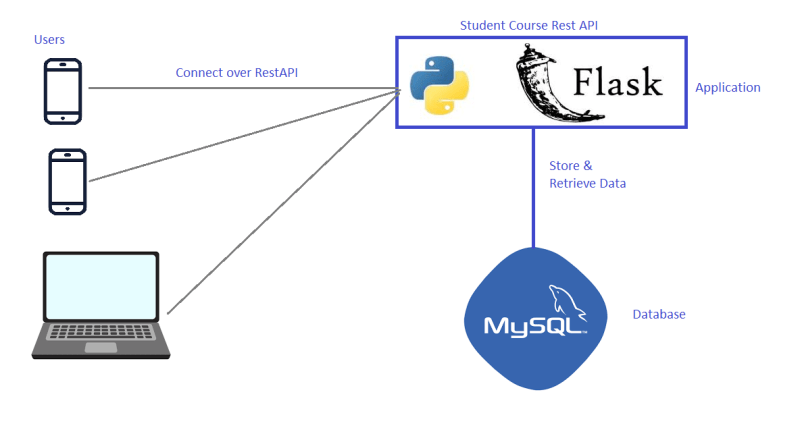
- To build the code of this tool
- Build steps
git clone https://github.com/khajadevopsmarch23/StudentCoursesRestAPI
docker image build -t <dockerhubusername>/spc:latest .
docker image push <dockerhubusername>/spc:latest
- Created a multi branch pipeline for two branches
Deployment
- The package in the case was a docker image which we pushed to docker hub
- To deploy this application we need k8s cluster. For this workshop we will use aks cluster
- Lets create a k8s cluster in azure Refer Here
- To connect to k8s cluster we need
kubectl
- To install cluster ensure azure cli is installed Refer Here
- Azure cli is authenticated
az login
- Create cluster
az aks create -g myResourceGroup -n myAKSCluster --enable-managed-identity --node-count 1 --enable-addons monitoring --enable-msi-auth-for-monitoring  --generate-ssh-keys
az aks install-cli
az aks get-credentials --resource-group myResourceGroup --name myAKSCluster
- Once cluster is created
kubectl get nodes
- For deployment
git clone https://github.com/khajadevopsmarch23/StudentCoursesRestAPI
cd StudentCoursesRestAPI
git checkout sprint_release_1
kubectl apply -f ./K8s/mysql-aws.yml
kubectl apply -f ./K8s/flask-aws.yml
Exercise
- Create a Jenkins pipeline which deploys spring petclinic application into some linux machine
- Suggestions:
- Run springboot as a linux daemon
- Use git flow as branching strategy
- Create a jenkins job for merging pull requests into develop branch
- Fork the spring petclinic into your account
- Have Jenkinsfile in your branches


