
Hosting Options in Azure Functions
- When we host azure functions, we have 3 hosting plans
- Consumption Plan
- Premium Plan
- Dedicated Plan (App Service)
- Hosting plan dictates the following behaviors
- How your function app is scaled
- Resources available to each function app instance
- Support for additional functionality such as Virtual Network Connectivity etc
- Consumption Plan:
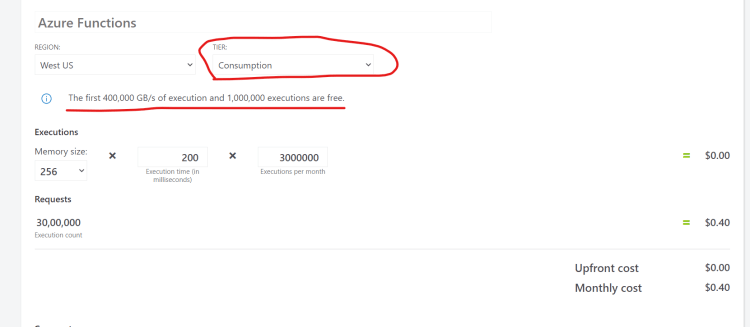
- This is purely serverless
- Scales automatically and we only pay for compute resource used when function was running.
- In this plan, the function instances are dynamically added and removed based of the incoming events
- Premium Plan:
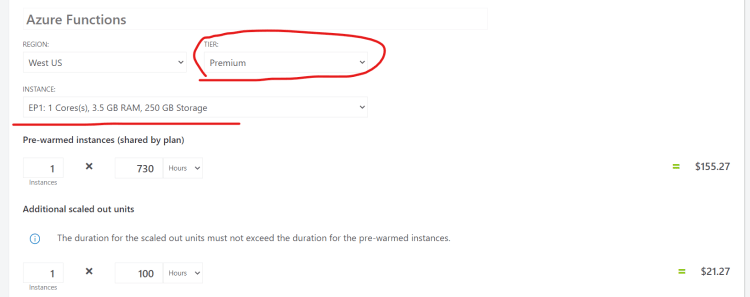
- Automatically scales base on demand using pre-warmed workers which applications run with no delay after being idle.
- Runs on more powerful instances and connects to virtual network
- This plan is recommended
- when your function runs continuously
- When we have a high number of small executions
- When function needs more cpu or memory than what is offered in Consumption plan
- Dedicated Plan:
- Run your functions within an App service Plan
- This is best of long-running scenarios.
Azure Functions triggers and bindings
- Scenario: A web request that uses Microsoft Graph to update an excel sheet
- Trigger: Http
- Output Binding: Microsoft Graph
- Scenario: A schedule job that reads Blob Storage contents and create a new cosmos db document
- Trigger: Timer
- Input Binding: Blob Storage
- Output Binding: Cosmos db
- Refer Here for official docs to list all the supported Bindings
- Refer Here for the binding examples from official docs
Event-Driven Architectures
-
To understand azure functions, we need to understand event-driven architectures, so we will be looking into
- Azure Event Grid and Hubs
- Notification Hubs
- Service Bus
- Message Queue
-
To understand event driven architecture consider the following scenario
- We have an ecommerce application
- User has placed an order
- Now as a response to this
- An email notification should be sent to the user
- Logistics team should ship the order placed and start the delivery process
- The order that has been shipped changes various states
- order recieved
- shipment arrived at Local Warehouse
- shipment arriving today
- shipment delivered
- shipment returned
- unable to deliver shipment


