Private Subnet in Azure
- In azure we need to create private subnets which will not have access from internet, if you need access to internet we need to create a NAT Gateway.
- Watch classroom recording
Network Interfaces
- Ips are assigned to Network interfaces
- AWS uses random allocation, where as azure uses sequential notation
- In AWS the size of subnet
2^n - 5
For example, in a subnet with CIDR block 10.0.0.0/24, the following five IP addresses are reserved:

10.0.0.0: Network address.

10.0.0.1: Reserved by AWS for the VPC router.

10.0.0.2: Reserved by AWS. The IP address of the DNS server is the base of the VPC network range plus two. For VPCs with multiple CIDR blocks, the IP address of the DNS server is located in the primary CIDR. We also reserve the base of each subnet range plus two for all CIDR blocks in the VPC. For more information, see Amazon DNS server.

10.0.0.3: Reserved by AWS for future use.

10.0.0.255: Network broadcast address. We do not support broadcast in a VPC, therefore we reserve this address.
- In Azure the size of subnet
2^n - 5

Yes. Azure reserves the first four addresses and the last address, for a total of five IP addresses within each subnet.

For example, the IP address range of 192.168.1.0/24 has the following reserved addresses:

192.168.1.0: Network address.
192.168.1.1: Reserved by Azure for the default gateway.
192.168.1.2, 192.168.1.3: Reserved by Azure to map the Azure DNS IP addresses to the virtual network space.
192.168.1.255: Network broadcast address.
- Exercise: try to find the smallest subnet and largest subnet in AWs and Azure
Reserve a static ip address (private) for an vm in azure/Aws
- Create a network interface with static ip and attach it to vm/ec2
DNS Name For VMs/EC2
- In AWS if we create an ec2 instance
- in default vpc
- we get public dns name if public ip is enabled
- we get private dns name
- in custom vpc
- we get private dns name
- To get public ip by default we need to configure this with enable dns hostnames => true in vpc
- In Azure we need to enable dns prefixes for public dns and private dns is machine name.
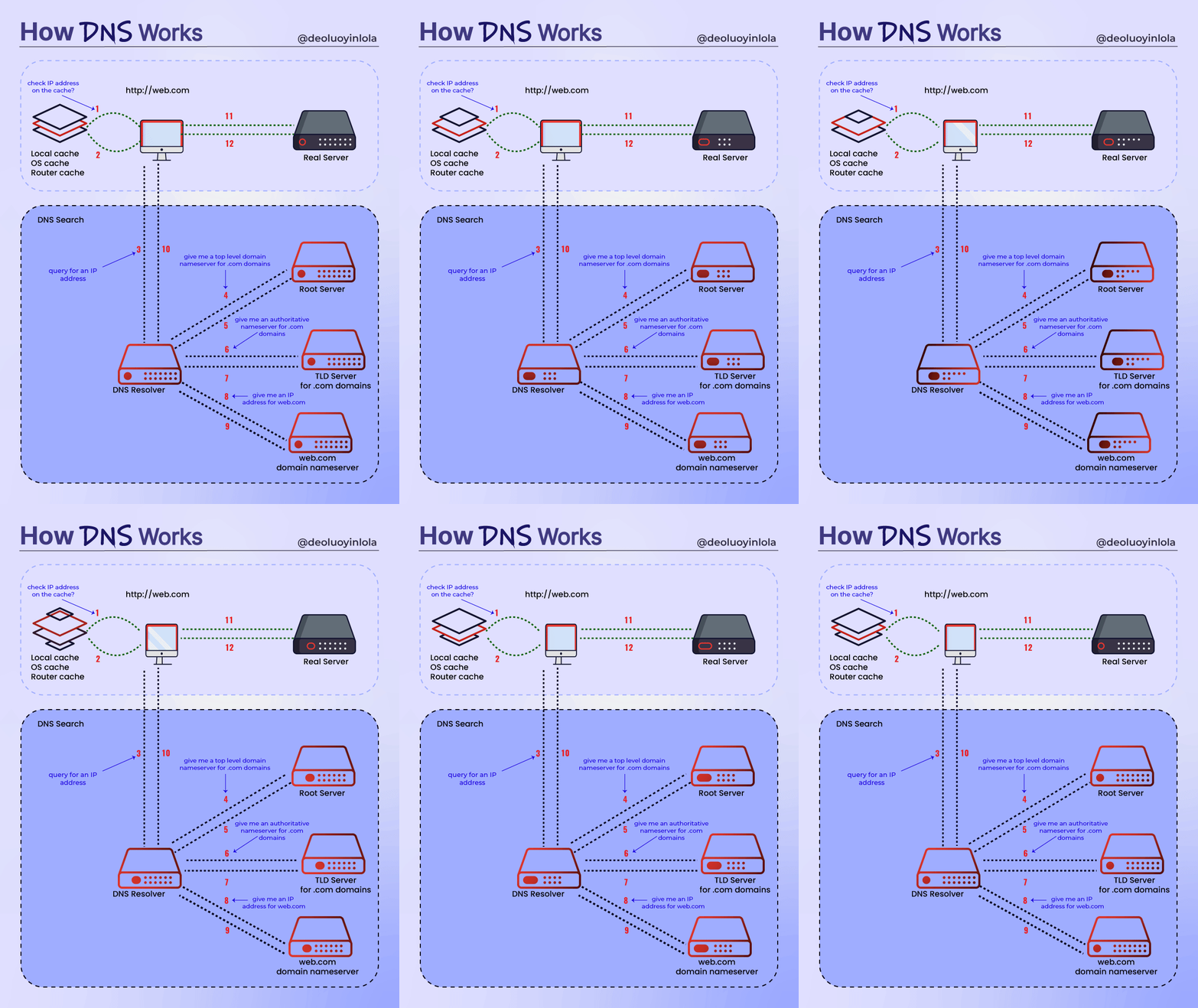
Purpose of DNS
- DNS servers will have records to
- map name to ip address
- map alias names
- show mail server informat
- show metadata.
- For doing this DNS servers maintain records. Record types of DNS
- A Record => name to ipv4
- AAAA Record => name to ipv6
- C Record => alias
- MX Record => mail server
- TXT Record => Metadata
- NS Record => Name server record
How DNS Works