Python
API Gateway, Lambda and Dynamo DB
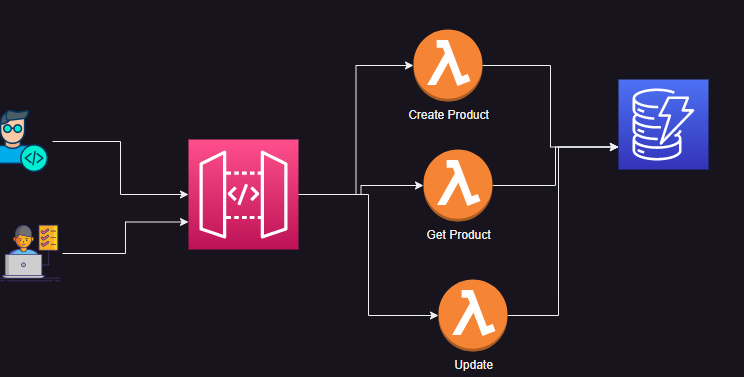
Write lambda functions to create and get products by id
import json
import boto3

def lambda_handler(event, context):
    dynamo_db = boto3.resource('dynamodb')
    products_table = dynamo_db.Table('products')
    product = products_table.get_item(
    Key = event
    )
    return {
        'statusCode': 200,
        'body': json.dumps(product['Item'])
    }
import json
import boto3

def lambda_handler(event, context):
    dynamo_db = boto3.resource('dynamodb')
    products_table = dynamo_db.Table('products')
    products_table.put_item(
        Item = event
    )
    return {
        'statusCode': 200,
        'body': json.dumps('Product Created')
    }
Lets Create an API Gateway
- Watch clasroom recording for steps
- Schema for product request
{
"$schema": "http://json-schema.org/draft-04/schema#",
 "title": "ProductModel",
 "type" : "object",
 "required" : [ "id" ],
 "properties" : {
   "id" : {
     "type" : "string"
   },
    "name" : {
      "type" : "string",

    },
    "price" : {
      "type" : "string"
    },
    "store": {
        "type" : "string"
    },
    "sku": {
        "type" : "string"
    },
    "description": {
        "type": "string"
    }

  }
 }
{
"$schema": "http://json-schema.org/draft-04/schema#",
 "title": "ProductQueryModel",
 "type" : "object",
 "required" : [ "id" ],
 "properties" : {
   "id" : {
     "type" : "string"
   }

  }
 }
Creating Azure Resources with Python
Consume APIs
Code Quality & Scanning for security
- Ensure tests are written and coverage is met
- Ensure there is no technical debt by using lint tools and static code analysis extensions in vscode
- Scan for security issues using SAST (Static Application Security Testing) and SCA (Software Composition Analysis)
- Lets scan for security using bandit
- Reference pipeline
on:
  push:
    - dev

jobs:
  lint-n-scan:
    runs-on: ubuntu-latest

    steps:
      - uses: actions/checkout@v4
      - name: Set up Python 3.12
        uses: actions/setup-python@v5
        with:
          python-version: 3.12
      - run: pip install -r requirements.txt
      - run: pytest
      - run: bandit -r .
  docker-scan:
    name: Push Docker image to Docker Hub
    runs-on: ubuntu-latest
    permissions:
      packages: write
      contents: read
      attestations: write
      id-token: write
    steps:
      - name: Check out the repo
        uses: actions/checkout@v4

      - name: Log in to Docker Hub
        uses: docker/login-action@f4ef78c080cd8ba55a85445d5b36e214a81df20a
        with:
          username: ${{ secrets.DOCKER_USERNAME }}
          password: ${{ secrets.DOCKER_PASSWORD }}

      - name: build docker image
        run: docker image build -t inventory:1.0
      - name: Run Trivy vulnerability scanner
        uses: aquasecurity/trivy-action@0.28.0
        with:
          image-ref: 'inventory:1.0'
          format: 'table'
          exit-code: '1'
          ignore-unfixed: true
          vuln-type: 'os,library'
          severity: 'CRITICAL,HIGH'

      - name: push the image
        run: docker image push <>


  deploy:
    name: deploy to k8s
    needs: ['lint-n-scan', 'docker-scan']
    runs-on: ubuntu-latest
    steps:
      - name: deploy
        runs: kubectl apply -f .deploy/


