
Web Applications
- Generally a web application is accessed using browsers over a dns name or ip address.
- http(s) is the communication protocol
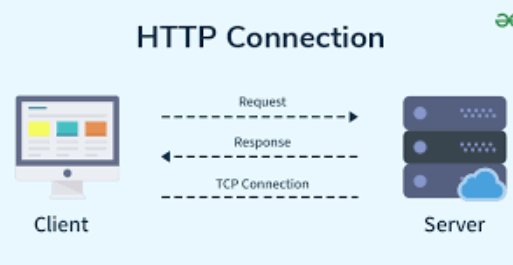
- while sending http request, we send
- url
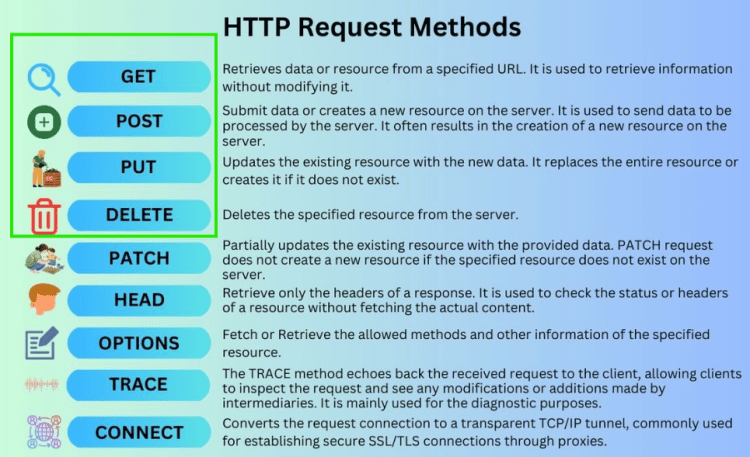
- http method
- headers (key value pair)
- body
- Http methods
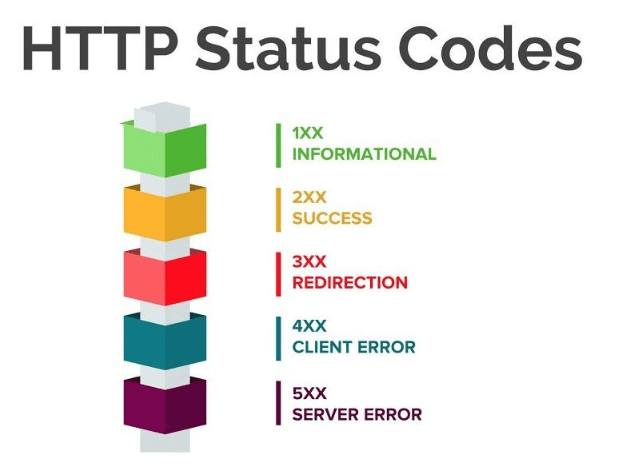
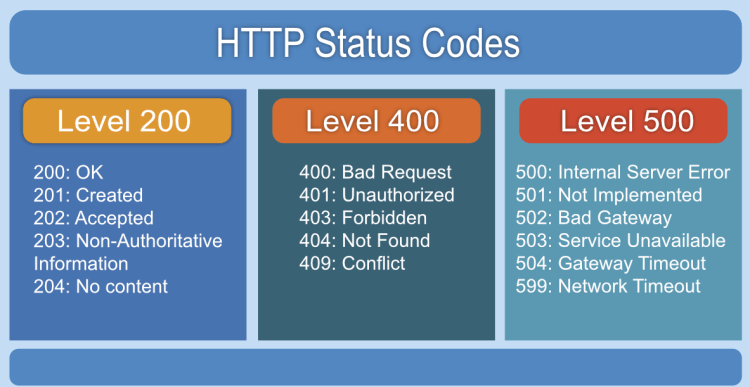
- HTTP response contians
- Status code
- Response body
- Headers
Generation of Web Applications
- Static HTML Pages: This was all inforamation posted and we had hyperlinks. To run this we need
- Web server
- Website:
- html
- images
- Website:
- Web server
- Dynamic HTML Pages: Users started interacting with websites
- At this point of time to handle interactivity on client side (browser), javascript was introduced, css introduced styles
- On the server side now the information has to be processed, stored and retrieved
- The introduction of smartphones, integrations with multiple platforms, The need for (something like function which runs of web from any language) where REST API fits perfectly.
- Every http has a url
REST APIs
A REST API, or Representational State Transfer Application Programming Interface, is a method used by software applications to communicate with each other over the internet. Here’s a breakdown of its key concepts in plain English:
What is REST API?
- Interface for Communication: A REST API allows different software systems to exchange information securely and efficiently. For instance, when a mobile app wants to retrieve data from a server, it uses a REST API to make that request[1][3].
- HTTP Protocol: REST APIs operate over the HTTP protocol, which is the same protocol used for browsing the web. This means they can use standard web methods like GET, POST, PUT, and DELETE to perform operations on resources[2][4].
How Does It Work?
- Client and Server: The process involves two main components:
- Client: This is the application or user making the request (like a web browser or mobile app).
- Server: This is the system that holds the data and responds to requests from clients[3][5].
- Making a Request:
- The client sends a request to the server using a specific URL (Uniform Resource Locator) that identifies the resource it wants to access.
- The request must include necessary details so that the server understands what is being asked[1][2].
- Processing the Request:
- The server checks if the request is valid and whether the client has permission to access the requested resource.
- If everything checks out, the server processes the request and prepares a response[1][3].
- Response from Server:
- The server sends back a response to the client. This response includes information about whether the request was successful and any data that was requested (like user information or images) in a standard format like JSON or XML[5][6].
Key Characteristics
- Statelessness: Each request from a client to a server must contain all the information needed to understand and process it. The server does not store any information about previous requests, making each interaction independent[2][5].
- Resource Identification: Resources (like user profiles, images, etc.) are identified by unique URLs. This makes it easy for clients to know exactly what they are requesting[1][4].
- CRUD Operations: REST APIs typically support basic operations known as CRUD:
- Create (POST): Add new data.
- Read (GET): Retrieve existing data.
- Update (PUT/PATCH): Modify existing data.
- Delete (DELETE): Remove data[6][7].
In summary, REST APIs provide a structured way for different software applications to communicate over the web, making it easier for developers to build and integrate services efficiently.
Citations:
[1] https://aws.amazon.com/what-is/restful-api/
[2] https://www.telerik.com/blogs/rest-apis-what-they-are-all-you-need-know
[3] https://www.techtarget.com/searchapparchitecture/definition/RESTful-API
[4] https://www.redhat.com/en/topics/api/what-is-a-rest-api
[5] https://konghq.com/blog/learning-center/what-is-restful-api
[6] https://www.freecodecamp.org/news/what-is-rest-rest-api-definition-for-beginners/
[7] https://www.geeksforgeeks.org/rest-api-introduction/


