
boolean and float types
- For float and bools Refer Here
First program: Average marks
- Solution
maths = 89
physics = 72
chemistry = 67
average = (maths + physics + chemistry) / 3
print(average)
-
Now we want to grade the student
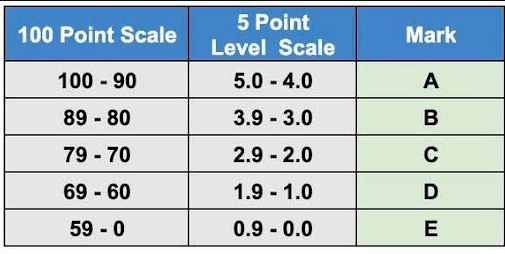
- Solution
maths = 89
physics = 72
chemistry = 67
average = (maths + physics + chemistry) / 3
print(average)

if average >= 90 and average < 100:
    print("Grade A")
elif average >= 80 and average < 90:
    print("Grade B")
elif average >= 70 and average < 80:
    print("Grade C")
elif average >= 60 and average < 70:
    print("Grade D")
elif average >= 0 and average < 60:
    print("Grade E")
else:
    print("Something went wrong, only prayers can fix this")
Conditional Statements in python and indentation
Python’s indentation rules are crucial for defining the structure and flow of code. Unlike many other programming languages, where indentation is merely a matter of style, Python uses indentation to determine the grouping of statements. Here’s an overview of the key rules and practices regarding indentation in Python:
Key Indentation Rules
- Mandatory Indentation:
-
Indentation is required to define blocks of code, such as those under
if,for,while, and function definitions. Without proper indentation, Python will raise anIndentationError[1][3]. - Default Indentation Level:
- The recommended standard for indentation is four spaces per level. While you can technically use any number of spaces, maintaining consistency is essential for readability[2][7].
- First Line Indentation:
- The first line of a Python script cannot be indented. Any indentation at the start will result in an error[1][4].
- Uniformity in Blocks:
- All lines within the same block must have the same level of indentation. Mixing different levels of indentation within a block will lead to errors[3][6].
- Use of Spaces vs. Tabs:
- It is preferred to use spaces over tabs for indentation. Mixing tabs and spaces can cause issues and lead to inconsistent behavior across different editors or platforms[2][4]. PEP 8, the style guide for Python code, strongly recommends using spaces.
- Indentation in Nested Structures:
- For nested structures, each new block should be indented an additional four spaces from its parent block. This clearly indicates the hierarchy and relationship between different code segments[6][7].
Examples
Correct Indentation
def greet():
    print("Hello!")  # 4 spaces for the first level
    if True:
        print("Python is awesome!")  # 4 more spaces for nested block
Incorrect Indentation
def greet():
print("Hello!")  # This will raise an IndentationError due to lack of indentation
Mixing Spaces and Tabs Example
def example():
    print("This line uses spaces")
    print("This line uses a tab")  # Mixing spaces and tabs raises a TabError
Conclusion
Proper indentation in Python is not just a matter of style; it is fundamental to how the language functions. Following these rules ensures that your code runs correctly and is easily readable by others. Adhering to PEP 8 guidelines by using four spaces for each level of indentation is a best practice that enhances code clarity and maintainability.
Citations:
[1] https://www.scaler.com/topics/python/indentation-in-python/
[2] https://www.prepbytes.com/blog/python/indentation-in-python/
[3] https://www.askpython.com/python/python-indentation
[4] https://www.w3schools.com/python/gloss_python_indentation.asp
[5] https://discuss.python.org/t/indentation-is-important/19835
[6] https://www.almabetter.com/bytes/tutorials/python/indentation-in-python
[7] https://peps.python.org/pep-0008/
Python if conditionals
leap year
- How to find the leap year
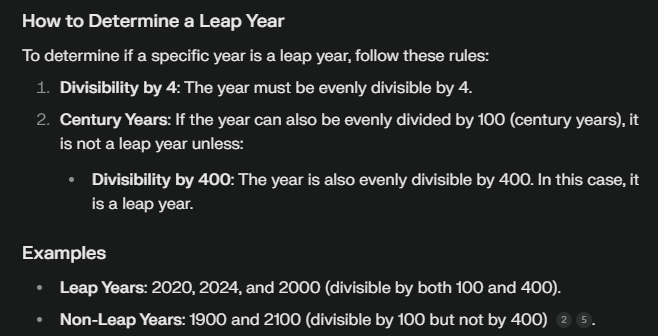
- Solution
year = 2001
if year % 4 == 0:
    if year % 100 == 0:
        if year % 400 == 0:
            print("leap year")
        else:
            print("not a leap year")
else:
    print("not a leap year")
Looping constructs
While
- Refer Here for examples
- Project euler problem 3
number = 13195
start = number - 1
while start > 1:
    # check if the start is factor
    if number % start == 0:
        # now we need to check if the start is prime or not
        is_prime = True
        index = 2
        while index < start:
            if start%index == 0:
                is_prime = False
                break
            index += 1
        if is_prime:
            print(start)
            break
    start -= 1
- Refer Here for changes
- Refer Here for while examples
Docstrings
Key Elements of Google Style Docstrings
- Summary Line: A brief description of the function or class, limited to one line.
- Parameters Section: Lists all parameters with their types and descriptions.
- Returns Section: Describes the return value and its type.
- Raises Section: (Optional) Lists exceptions that the function may raise.
- Examples Section: (Optional) Provides examples of how to use the function.
Example of a Function Docstring
Here is an example of a well-structured docstring for a function:
def add_numbers(a: int, b: int) -> int:
    """Adds two numbers.

    This function takes two integers and returns their sum.

    Args:
        a (int): The first number to add.
        b (int): The second number to add.

    Returns:
        int: The sum of `a` and `b`.

    Examples:
        >>> add_numbers(2, 3)
        5
        >>> add_numbers(-1, 1)
        0
    """
    return a + b
Example of a Class Docstring
Here’s how to document a class using Google style:
class Calculator:
    """A simple calculator class.

    This class provides basic arithmetic operations like addition,
    subtraction, multiplication, and division.

    Attributes:
        last_result (float): The result of the last operation performed.
    """

    def __init__(self):
        """Initializes the Calculator with no previous result."""
        self.last_result = 0.0

    def multiply(self, a: float, b: float) -> float:
        """Multiplies two numbers.

        Args:
            a (float): The first number.
            b (float): The second number.

        Returns:
            float: The product of `a` and `b`.
        """
        self.last_result = a * b
        return self.last_result
Additional Notes
- Use Triple Quotes: Always use triple double quotes (
""") for docstrings. - Formatting: Ensure that your docstrings are formatted consistently throughout your codebase.
- Avoid Redundancy: If you are using type annotations in the function signature, you can choose to omit them from the docstring, as per community consensus [5].
By adhering to these guidelines, you can create clear and informative documentation that will help other developers understand your code better.
Citations:
[1] https://sphinxcontrib-napoleon.readthedocs.io/en/latest/example_google.html
[2] https://gist.github.com/redlotus/3bc387c2591e3e908c9b63b97b11d24e
[3] https://www.datacamp.com/tutorial/docstrings-python
[4] https://drake.mit.edu/styleguide/pyguide.html
[5] https://stackoverflow.com/questions/65768215/type-annotations-with-google-style-docstrings
Example of a Module Docstring
Here’s an example of how to write a module docstring following Google style:
"""
math_operations.py

This module provides basic arithmetic operations including addition,
subtraction, multiplication, and division. Each operation is implemented
as a separate function that can be imported and used in other modules or
scripts.

Functions:
    add_numbers(a: int, b: int) -> int:
        Returns the sum of two integers.

    subtract_numbers(a: int, b: int) -> int:
        Returns the difference between two integers.

    multiply_numbers(a: float, b: float) -> float:
        Returns the product of two numbers.

    divide_numbers(a: float, b: float) -> float:
        Returns the quotient of two numbers. Raises ZeroDivisionError if
        the second number is zero.

"""

def add_numbers(a: int, b: int) -> int:
    """Adds two numbers."""
    return a + b

def subtract_numbers(a: int, b: int) -> int:
    """Subtracts the second number from the first."""
    return a - b

def multiply_numbers(a: float, b: float) -> float:
    """Multiplies two numbers."""
    return a * b

def divide_numbers(a: float, b: float) -> float:
    """Divides the first number by the second.

    Raises:
        ZeroDivisionError: If `b` is zero.
    """
    if b == 0:
        raise ZeroDivisionError("division by zero")
    return a / b
Key Components of the Module Docstring
- Module Name: The name of the module and its purpose.
- Overview: A brief description of what the module does.
- Functions: A list of functions provided by the module along with a short description of each.
Benefits of Using Module Docstrings
- Clarity: Provides immediate context for anyone reading or using the module.
- Documentation Generation: Many documentation tools can extract module docstrings to generate comprehensive documentation automatically.
- Maintainability: Helps maintain code by providing clear information about what each part of the module does.
By including a well-written module docstring at the top of your Python files, you enhance code readability and usability for yourself and others who may work with your code in the future.
Terms
- A Python file such as main.py or factors.py are referred as modules


