
Docker image building
- Manual Steps:
- Ensure python is installed
- Ensure pip is installed
- clone the code from github
git clone https://github.com/khajasampleapps/basicflask.git - Execute
pip install -r requirements.txt - To run your application
python app.py
- Refer Here for the Dockerfile
- Now if we want to make this image available to others, we need to push the image to the registry.
- Generally the format for registry is
<username>/<image>:<tag> - DockerHub:
- This is a public registry and also it has private registry option

- Execute the command
docker login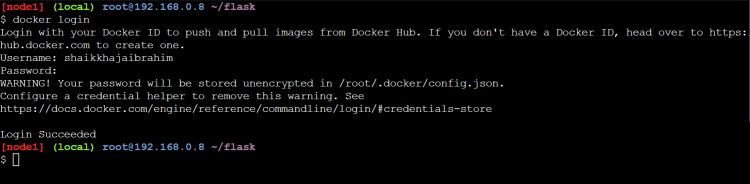
- Now push the tagged image

- Now any one can run this flask application
docker container run -d -P shaikkhajaibrahim/flaskdemo:1.0.0 - This is a public registry and also it has private registry option
- Other Registries
- AWS ECR: This supports public and private registries hosted on AWS.
- To work with this install AWS CLI Refer Here


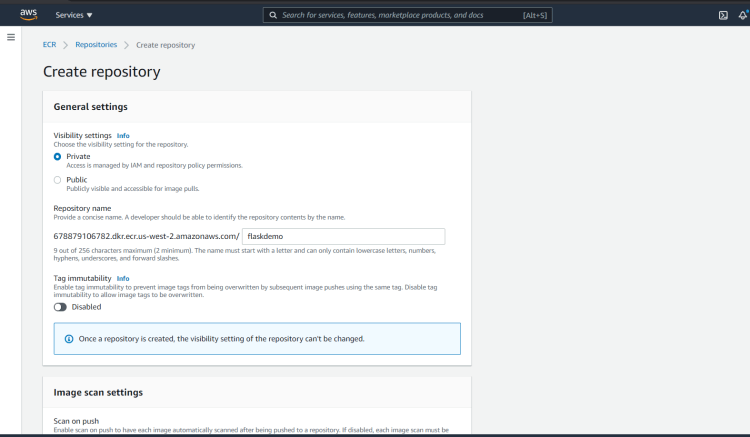


- To work with this install AWS CLI Refer Here
- Azure Container Registry: This is registry hosted on azure Refer Here
- Install Azure Cli Refer Here
- Artifactory/jfrog: Refer Here
- AWS ECR: This supports public and private registries hosted on AWS.
Multi Staged Builds
- Overview:

- Lets try to build the springpetclinic
- Manual steps:
- this needs jdk 11
- We need maven
git clone https://github.com/spring-projects/spring-petclinic.git cd spring-petclinic mvn package # this generates the jar file - Dockerfile with multistaged build
FROM maven:3-openjdk-11 AS builder
RUN git clone https://github.com/spring-projects/spring-petclinic.git \
    && cd spring-petclinic \
    && mvn package


FROM openjdk:11
LABEL author="khaja"
EXPOSE 8080
COPY --from=builder /spring-petclinic/target/spring-petclinic-2.5.0-SNAPSHOT.jar /spring-petclinic.jar
CMD ["java", "-jar", "/spring-petclinic.jar"]
- Lets try to build the gameoflife
- Manual steps:
- This requires jdk 8
git clone https://github.com/wakaleo/game-of-life.git cd game-of-life mvn package - Exercise: Create a mutlistage build for gameoflife and springpetclinic and push the image to docker hub and any private registry.


