
Provisioning Virtual Machines
- Architecture:
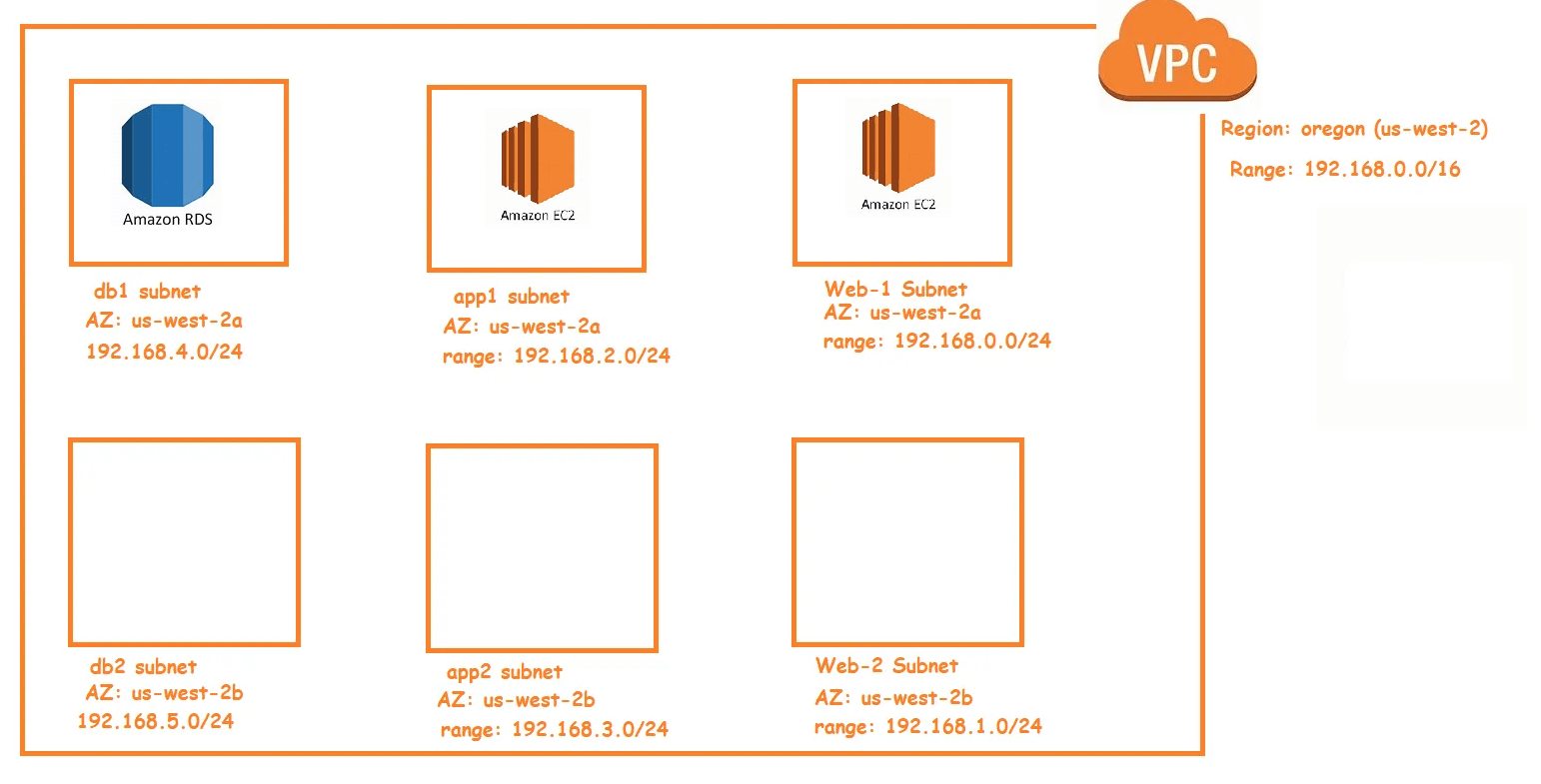
- In the ec2 instances created, we need to deploy applications.
- To deploy the applications, we need to login into the vm and execute the instructions/steps to deploy application
- Terraform calls this as provisioning
- Terraform supports some provisioners to get the job done Refer Here for the official docs

- File provisioner is used to copy the file from the machine executing terraform into the vm created by terraform
- local-exec: This provisioner invokes a local-resource on the machine running terraform
- remote-exec: This provisioner invokes the script on the remote resource created. In terraform when we want to execute the shell/powershell/ansible playbook on remote machine we use this provisioner
- chef: this provisioner configures the chef-client on remote resource and can execute the run_list
- puppet
- salt-masterless
- Most provisioners which require remote-access i.e. they need to login into remote resource via ssh or winrm and terraform has a connection object for this Refer Here
- Lets try to install apache server on web1 instance
sudo apt update
sudo apt install apache2 -y
- Provisioner will be executed while creating the resource only.
- Refer Here for the changes done
- Now lets try to access webserver

- Everytime tainting a resource to execute provisioner is not a decent practice, so we need a approach to run provisioning without a resource Refer Here
- Teraform has a null resource which will not create any thing but will be executed by triggers
- Now after making changes to use null resource, we need to perform terraform init as null resource is part of null provider
- Refer Here for the changes

- null_resource executes every time, if you want null_resource to be executed only when some resource change, then use the triggers attribute
- When we execute the terraform we get the output information as apply complete

- It will be good if we can see some more output information like vpc id, ec2 instance ids, public ip to access webserver
- To achieve this in terraform we have terraform outputs Refer Here for the official documentation
- Lets add some outputs
- vpc id
- webserver instance id, webserver public ip, webserver private ip
- appserver instance id, app server private ip
- url of the php info page
- For the changes made Refer Here

- Exercise: Add the following outputs
- subnet ids
- private route table id
- public route table id
- rds endpoint
- Next Steps:
- Lets learn how to make terraform template reusable
- Lets understand the impact of running templates parallely on different machines and how to resolve that


