
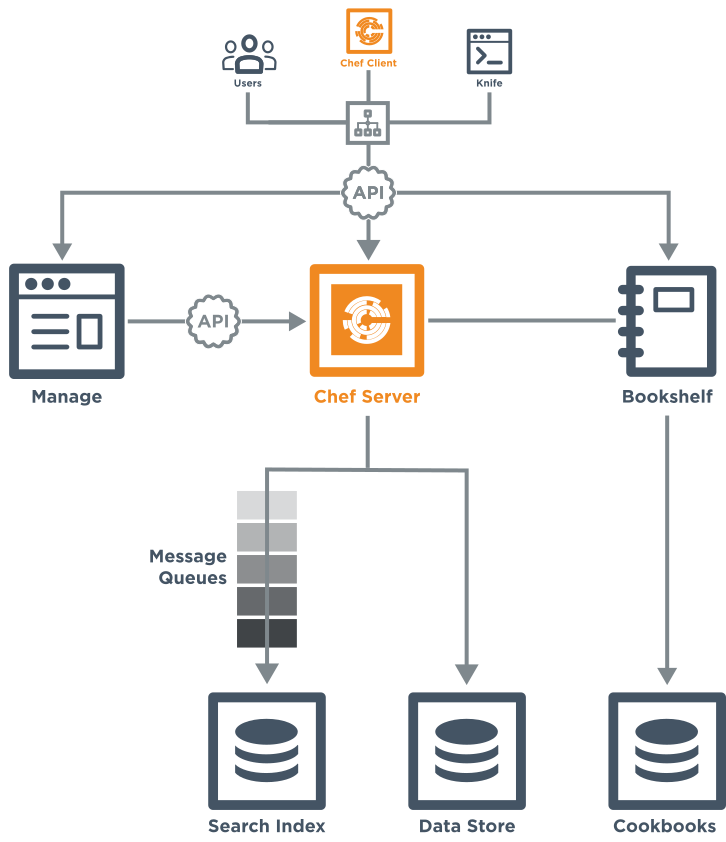
Chef Infra Server Components
- Infra Components Refer Here
Creating Lab Environment
- In this scenario
- PROD: will be Ubuntu 18 machines from aws
- UAT: Will be Ubuntu 18 machines from aws
- QA: Will be Ubuntu 18 machine from azure
- Upload qthms-app and qthms-db to the chef server
- Now lets bootstrap manually all the nodes from workstation to nodes
- Lets bootstrap chef server in the qa, uat and prod environments

- Lets try to come up with run_list for every node
QA : qthms-app::default,qthms-db::default

uat
	app: qthms-app::default

	db: qthms-db::default

prod:
	app: qthms-app::default

	db: qthms-db::default
- In a large kind of deployment, managing run_lists is not effecient by add recipes to every node.
- To manage this lets create two roles
- appserver
- dbserver
- Roles can be created from chef-manage.

- But it is a good practice to have version control of your roles. so lets create roles files in chef-repo
- For Roles Official docs Refer Here
- Lets create two roles in the roles folder with the following content for
- appserver.rb
name 'appserver' description 'This is qthms appserver' run_list 'qthms-app::default'- dbserver.rb
name 'dbserver' description 'This is qthms dbserver' run_list 'qthms-db::default' - Now lets upload the roles to the chef server
knife role from file <path-to-rb>

- Now lets edit run lists to have the roles in the run_list rather than recipes
- Now the convergence time is 30 minutes for all the servers. Now lets learn how to change that
- Client Configurations can be changed from client.rb file in the chef repo refer Here or easier way is to add the following cookbook to the run_list refer Here
# first approach
Chef::Config[:interval] = <seconds>
- To do common configuration lets create a cookbook qt-general
- In this cookbook lets add dependency of chef-client and set the attribute
default['chef_client']['interval']= '1800'
- Now we need to add this recipe to all the nodes, we have roles, go and change the roles
- For app servers the interval should be ‘3600’ seconds for db servers the convergence should be ‘7200’
- The appserver.rb (role)
name  'appserver'
description 'This is qthms appserver'
run_list 'qt-general::default', 'qthms-app::default'
default_attributes(
    'chef_client' => {
        'interval' => '3600'
    }
)
- Role db server
name  'dbserver'
description 'This is qthms dbserver'
run_list 'qt-general::default','qthms-db::default'
default_attributes(
    'chef_client' => {
        'interval' => '7200'
    }
)
- Now we need to add a new version of the cookbook to include java ’11’ and also install apache server
- Now make changes and after successful testing of this cookbook if you upload changes it will be applied to all servers in appserver role which is not what we want.
- We want this changes to be applied only to QA, SO this is where environments come into play. \
- Like Roles environments can be created from manage, inside chef-repo Refer Here
- By default chef has a environment already called as _default

- Now lets create 3 environment files in environments folder in chef repo
- qa.rb
- uat.rb
- prod.rb
- Refer to git for these files
- Lets upload the environments
knife environment from file <path-to-env>


-
Lets apply environments to the nodes

-
Now upload the cookbook

-
Verify the QA Environment

-
Verify in other Environment

-
Now we have multiple places where we define attributes
- recipe
- attribute file
- roles
- environments
-
Lets understand what gets applied.
-
Chef has an extra layer which is attribute types
- default
- force_default
- normal
- override
- force_override
- automatic
-
We have 4 different places and six different types where attributes can be defined
-
Chef follows the following table for precedence

-
Refer Here for offical docs
-
Note: GitHub Link Refer Here
Next Steps
- How to deal sensitive Content in chef (data bags)
- How to avoid manual bootstrapping
- What is Chef Automate
- How to use chef for managing infra in AWS (OpsWorks) & Azure (VM Extensions)
- Exercises


