Networking (contd..)
- Answer of previous question
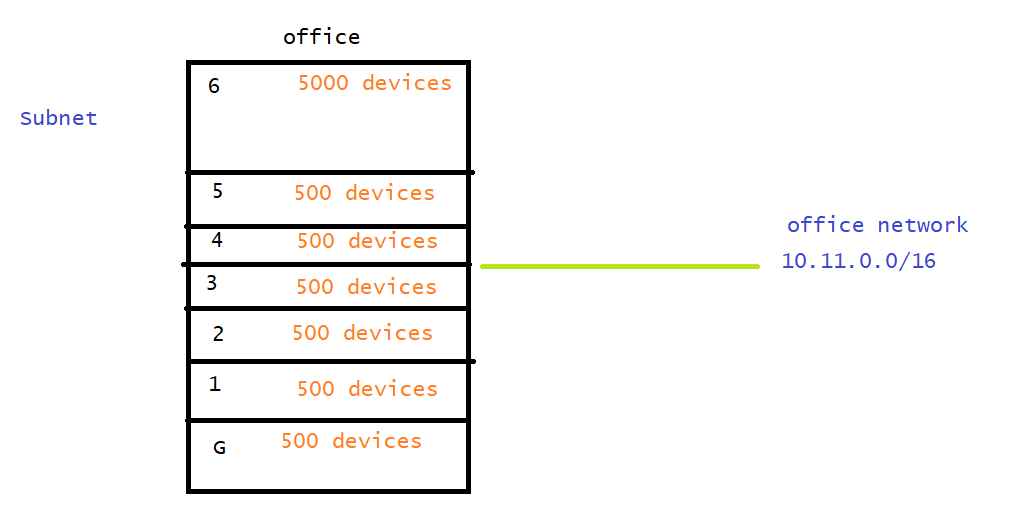
network: 10.11.0.0/16
         255.255.0.0  => 65000

n = 9

10.11.0000000   0.00000000

10.11.0.0/23 G

10.11.0000001   0.00000000
255.255.254.0
10.11.2.0/23 F
10.11.4.0/23 S
10.11.6.0/23 3
10.11.8.0/23 4
10.11.0000101   0.00000000
10.11.10.0/23 5
10.11.00100000.00000000
10.11.32.0/19
255.255.224.0
- If we want to send network packets from one network to other network then we need Router. in the ipconfig, the Default Gateway is ipaddress of your router

- Every router has set of rules which are called as route tables, These route tables (routes) define where the packets can be sent depending on destination
- When a device in a network tries to communicate with any other device in the same network, the packets are forwarded directly using existing (wired or wireless) infra.

- When a device in a network tries to communicate with any other device from a different network, packets are forwared to the router. Router checks the route tables(routes) and it forwards the packet to its connected network to reach to destination

- We can examine the different routers/networks touched when communicating to other networks ip addresses
tracert google.com

How about networks in Azure
-
A conventional network engineer deals with physical assets such as rotuers, switches, firewalls, cables etc to build infrastructure. At a logical layer you configured VLAN, Spanning Tree, Routing Protocols (RIP, OSPF, BGP) etc. For managing this network we use network management tools and CLI
-
Networking in the cloud is different your network endpoints are logical and use of routing protocols in minimum.
-
When we plan to deploy our applications to azure we start by creating a logical boundary in Azure called as Virtual Network (you don’t need any physical) but we still need to plan for logical entities such as IP address, Subnets, routing and policies.
-
Lets create a virtual network with four subnets in Azure using portal.
- What we create in Azure is resource and in Azure every resource has to belong to a group which is called as Resource group.
- The scope of logical network boundary in Vnet is Region.
- The virtual Network which we create in Azure will be in one and only one Region
- No price involved for creating a vnet


-
Exercise: Try to create virtual network in azure as mentioned below