
Mappings and Data types
- Elasticsearch supports a wide variety of data types for different situations where you want to store text data, numbers, booleans, binary objects, arrays, objects, geo-points, geo-shapes, and many other data types, such as IP addresses.
- Refer here for complete list of Datatypes
- Mapping is the process of defining how document are indexed.
- Two Kinds of Mappings can be done
- Dynamic
- Explicit
- Refer here for complete documentation on Mappings
Index API
- Refer here for Index APIs
- Lets use Kibana Console to experiment with the Index APIs
- Basic structure of the Index APIs are
http://<elasticsearch host>:<port>/<index>/<type>/<document id>
-
To experiment with elastic search we need to generate fake data. For that i have written a very simple python program.
-
Make sure you make changes to Ip address and execute
pip install requestsbefore you run this program -
Program can be found here
-
This program generates 10 days of log data, with each date being in a index
-
Execute the program with the following command
python <filename>.py -
Wait for some time and Open Kibana UI.
-
Navigate to Kibana Management

-
Select the Index Patterns

-
Click on Create Index Pattern
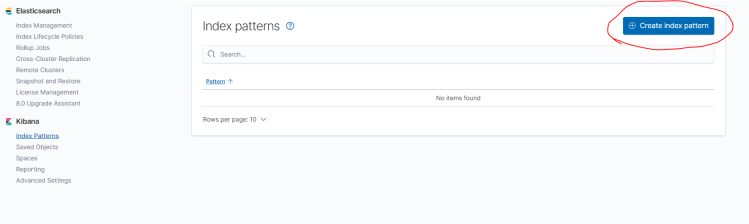
-
Enter *-fakeindex as shown in image below and click on next step
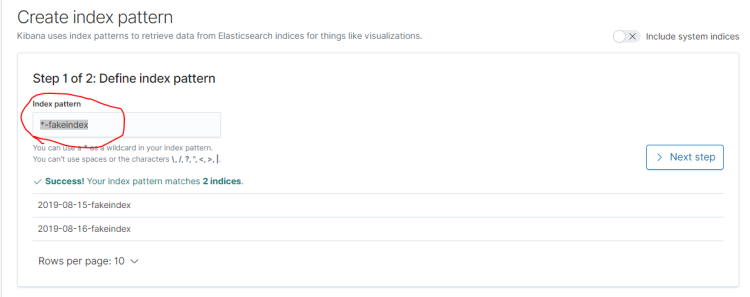
-
Select the time field as date_posted and Create Index Pattern
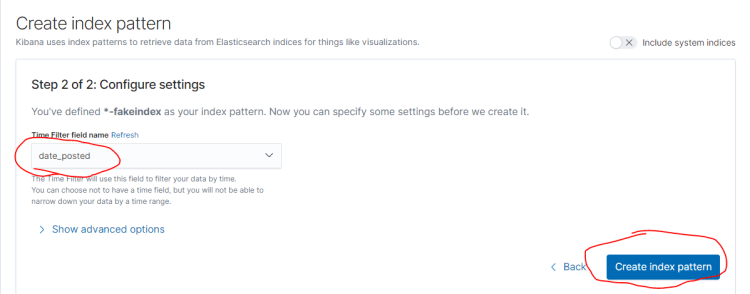
-
You should be able to see the field mappings

-
Now click on Discover

-
Select Time period to be 1 year and you should be able to (Program starts publishing log data from Aug 15 2019)
-
Note: There is one more program with fake cpu values here


1 comment