
Naming Storage Accounts
- When naming the Azure storage account, we need to ensure
- The storage account name must be unique across all the storage accounts in Azure.
- The name must be between 3 to 24 characters & can contain only lowercase letters and numbers
Performance Tiers
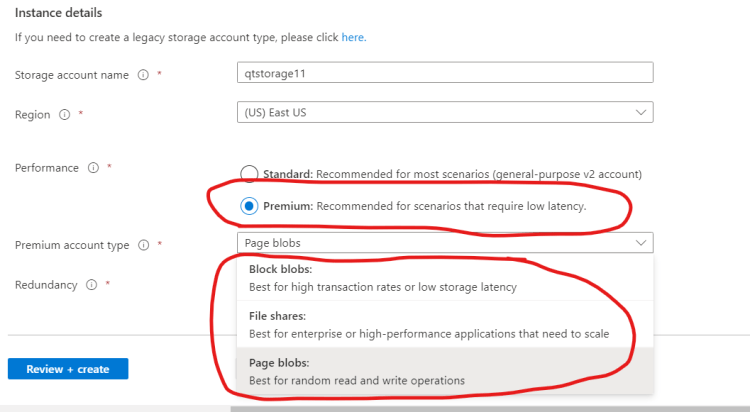
- When creating the storage account, we need to choose between Standard & Premium Performance Tiers. This setting cannot be changed later
- Standard:
- This tier supports all storage services
- blobs
- tables
- files
- queues
- unmanaged Azure Virtual Machine disks
- This tier supports all storage services
- Premium:
- This tier is designed to support workloads with greater demands on I/O and is backed by high-performance SSD disks.
- It only supports General Purpose Accounts with Disk Blobs & Page Blobs.
- It also supports Block Blobs or Append Blobs with BlockBlobStorage Account & Files with FileStorage accounts
- Standard:
Redundancy or Replication Options
- When we create a storage account, we can also specify how our data will be replicated for redundancy and resistance to failure.
- Locally Redundant Storage (LRS):
- Makes three synchronous copies of our data within a single datacenter
- Available for both the Standard & Premium Performance Tiers
- Zone Redundant Storage (ZRS):
- Makes three synchronous copies of our data to three seperate availability zones within a single region
- Geographically Redundant Storage (GRS):
- This is same as LRS (three local copies) plus three additional asynchronous copies to a second datacenter hundreds of miles away from the primary region.
- Data replication to other Geography typically occurs within 15 minutes (although ther is no SLA provided)
- Geo Zone Redundant Storage:
- This is same as ZRS (three synchronous copies across Zones), plus three additional asynchronous copies to second datacenter hunderds of miles away from the primary region.
- Data replication to other Geography typically occurs within 15 minutes (although ther is no SLA provided)
- Locally Redundant Storage (LRS):
- Refer Here for the official docs.
Access Tier
- Azure Blob Storage supports three access tiers
- Hot:
- This access tier is used for frequently accessed data.
- Relative to other tiers data access costs are low, while storage costs are higher
- Cool:
- This access tier is used to store large amounts of data i.e not accessed frequently & this is stored for atleast 30 days.
- The availability SLA is lower than Hot tier.
- Relative to Hot tier access costs are higher & storage costs are lower
- Archive:
- This access tier is used to archive data for long term storage i.e. accessed rarely & can tolerate several hours of retrieval latency & will remain in Archive tier for atleast 180 days.
- This tier is most-cost effective for storing data, but access data is more expensive than Hot or Cool tiers.
- Evaluate prices using pricing calculator Refer Here
- Hot:


