
Google VPC (Virtual Private Cloud)
- VPC Provides networking functionality to Virtual Machnes, GKE clusters and App Engine
- VPC can be thought in the same way as Physical Netowrk, except it is virtualized within Google cloud
- VPC is a global resource i.e. it consists of list of regional subnetworks in datacenters, all connected by a Global wan.
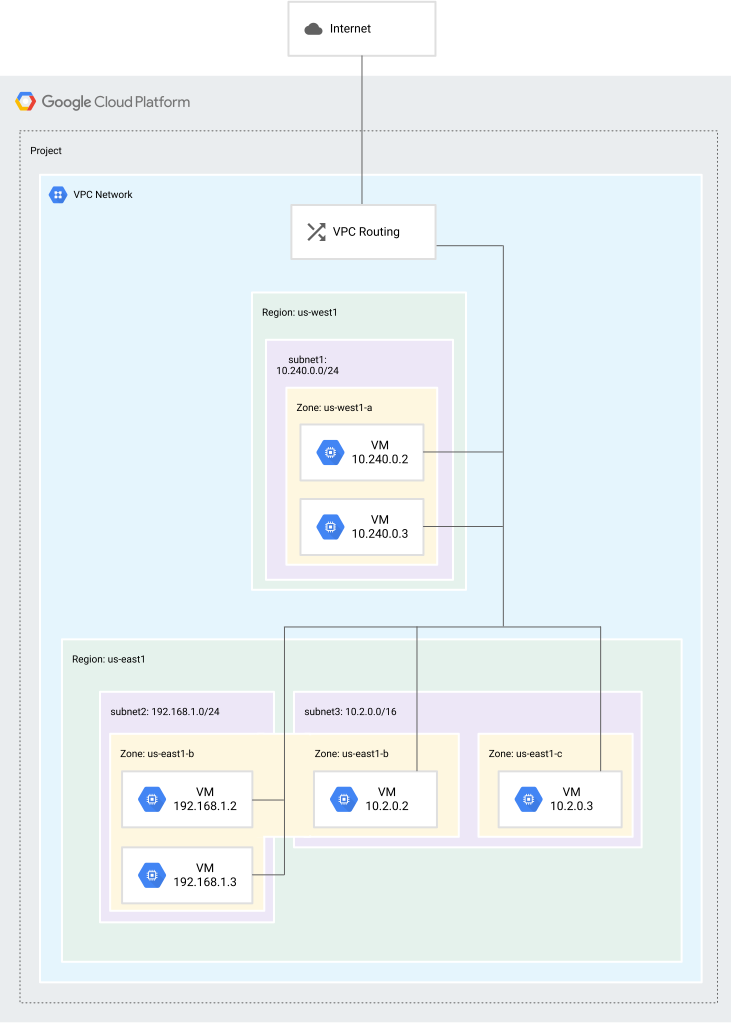
- In GCP
- vpc is a global resource
- subnet is a regional resource
- While vpc is a gloabl resource, all routes and associated firewall rules are also global.
- All resources created within a vpc can talk to each other using the internal private IP address if you enable private google access to them.
- Subnets are associated with a particular region and in one region we can more than one subnet.
- VPC’s can be created in two modes
- auto mode:
- one subnet is automatically created inside each region using predefined IP ranges that fit with in a 10.128.0.0/9 block

- one subnet is automatically created inside each region using predefined IP ranges that fit with in a 10.128.0.0/9 block
- custom mode: In this mode VPC network, no subnets are created and its up to you create your own subnets and IP ranges that best suits your needs.
- auto mode:
- Every project in GCP will have one default VPC
- When creating an vm instance, you selet a zone, a network and subnet
- There are some quotas(can be increased)/limits(cannot be increased) which can be increased by raising a ticket with Google.
- VPC Networks per project Quota of 5
- VM instances per network Limit of 7000
- Exercise:
- Lets Create an auto network in the project


- Lets create a vpc with range 192.168.0.0/16 and the subnets with 250 devices
- mumbai
- central us


- Lets add one more subnet in east us


- Lets Create an auto network in the project
- Lets assume a scenario where every day we are asked to create networks for deploying applications, doing this manually doesnot make sense
- Lets try to automate this by using Command line interface Refer Here
- Install google Cloud sdk close all terminals once the installation is successful and relaunch any terminal and type
gcloud --version


