
EBS Snapshots
- Backup of the data on EBS volumes can be acheived by taking Snapshots
- Snapshots are incremental backups
- Basic process of snapshots

- Backups can be restored to create EBS Volumes
- Restore Snapshot 1

- Restore Snapshot 2

- Restore Snapshot 3
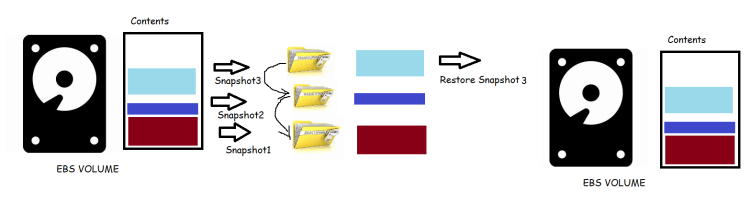
- Restore Snapshot 1
- Deleting Snapshots
- Delete Snapshot 1

- Deleted Snapshot 2 (Snapshot 1 is still Existing)

- Delete snapshot 3 (Latest Snapshot):

- Note: In AWS there will no impact if you delete the older snapshots, but if you delete the latest snapshot you might loose data. So prefer deleting older snapshots.
- Delete Snapshot 1
- EBS Volume is a Resource of Availability Zone, Where as snapshot is accessible across the region. Using the Snapshot we can create an EBS volume in any AZ of the same Region.
- To create an EBS volume in the different region with same data we can copy the snapshot from one region to another, Then use this snapshot to create a EBS volume.
- Activity:
- Lets create an EC2 instance with two volume (one os disk) add additional disk


- Now lets login into ec2 instance
ssh -i <path to pem> ubuntu@<publicip>
- Lets list block devices and create a filesystem and mount


- Now lets create some content in that drive

- Now lets try to create the snapshot of the disk with 1 GB Storage


- Now Delete the ec2 instance.
- Next Steps:
- Using the Snapshot which we have create, lets create EBS volumes in same region and any different region.
- Mount the EBS volume to some ec2 instance and verify the data
- Lets create an EC2 instance with two volume (one os disk) add additional disk


