
Linux Foundation Series
Linux – The Operating System
- RedHat Linux, Ubuntu, Centos, SUSE etc are called as distributions.
- Distribution is Linux + software suite of applications,developer tools
- In this essence Linux is core of the operating system: kernel
Layers of Abstraction in Linux
- General Linux System Organization

- Layers are
- Hardware
- Kernel
- User Process
- Kernel is in charge for managing
- Processes
- Memory
- Device Drivers
- System Calls
- fork
- exec
- User Space:
- Kernel allocates memory for user processes and this is called as userspace.

- User: A user is an entity that can run processes and own files.
- Kernel allocates memory for user processes and this is called as userspace.
Shell and Terminal
- when we speak of the commandline we are referring to shell. Shell is a program takes commands and passes them to OS to carry out.
- Almost all the distributions a shell program called as bash is supplied.
- To interact with shell we need a terminal
Creating Linux Instances on the cloud
- Refer Here for setting up the softwares
- Refer Here for creating a linux ec2 instance in aws
- Refer Here for creating a linux azure vm
- Prerequisities
- Softwares
- Git Bash
- Visual Studio Code
- One free tier cloud account (AWS/Azure)
- Softwares
- Linux Distributions
- Ubuntu 18
- Centos 7
- Lets create a linux instance and login into that
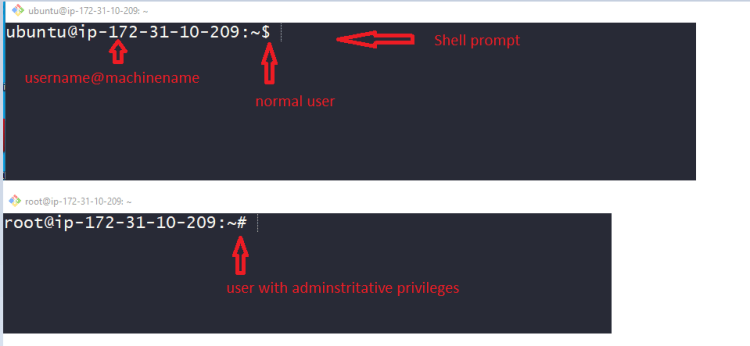
Standard Input and Standard Output
- Linux Processes use I/O streams to read and write data.
- Streams are very flexible, the source of input stream can be a file, device or it can be even the output stream of other process
Linux Commands
- In the shell prompt we generally execute commands. Lets execute some simple commands
date
cal

- Basic command syntax
<command> <args>
echo hello
- Arguments of two types
- Positional arguments:
<command> <arg1> <arg2> ... cp 1.txt 2.txt- Named arguments
<command> --<argname> <argumentvalue> ping -c 4 google.com - ls: this command is used to list the contents of the directory
ls
ls -a


- touch: this command creates an empty file
touch 2.txt
- cp: this command copies files
cp file1 file2
- mv: this command moves (rename) the files
- rm
- echo
Linux directory hierarchy
- Linux directory

- / => root directory
- /bin => Binaries and other executables
- /etc => system configuration files
- /home => home directories
- /opt => optional or third party softwares
- /tmp => Temporary space
- /usr => User related programs
- /var => variable data, log
- experiment with mkdir, rmdir, less, file, head, tail, exit
Environment and Shell variables
- Shell variables: Shell can temporarily store variables called as shell variables
<VAR-NAME>=<value>
TOPIC=linux
To access variable use $
echo $TOPIC
- Environmental variable: This is also like shell variable, but its not specific to the shell.
export <variable>
- There is one important environmental variable which is PATH. PATH variable will inform linux to find the commands
echo $PATH
Using Text Editors
- Every linux generally has a text editor which is vim.
- To learn using vim please refer here
- Other editor is nano


