Docker lifecycle

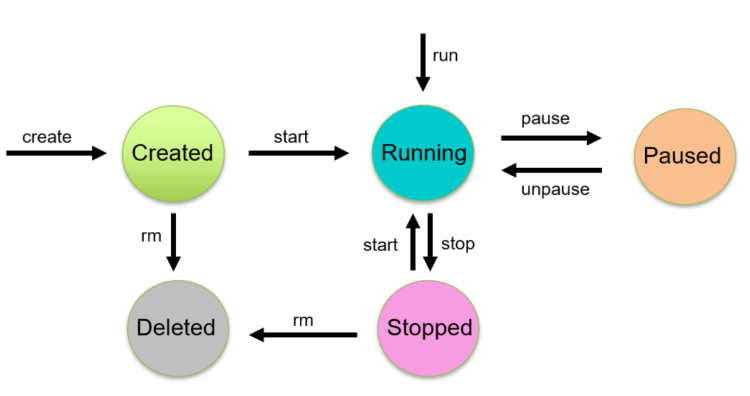
Common docker commands
- A container is running and you want to see the logs
docker logs <contaner-id or name>
docker logs <contaner-id or name> -f
-
Docker logs shows only stdout and stderr
-
I want to delete all containers in my system
docker rm -f $(docker ps -a -q)
- I want to delete all images in my system
docker rmi $(docker image ls -q)
- You want to clean the images, volumes which are not being used
docker system prune -a
- You have a container running and for some reason you want to copy a file into it
docker cp <file> <container-name-or-id>:<path>
docker cp 1.txt test1:/
- You can copy the files from container into local system
docker cp <container-name-or-id>:<path> <file>
docker image inspect <id>
docker container inspect <id>
How are images built and organized
- Docker image is collection of read-only image layers and these layers are created during building images.
- Try to create minimal layers
RUN apt update \
    && apt install tree &&\
    apt install mysql-client


