

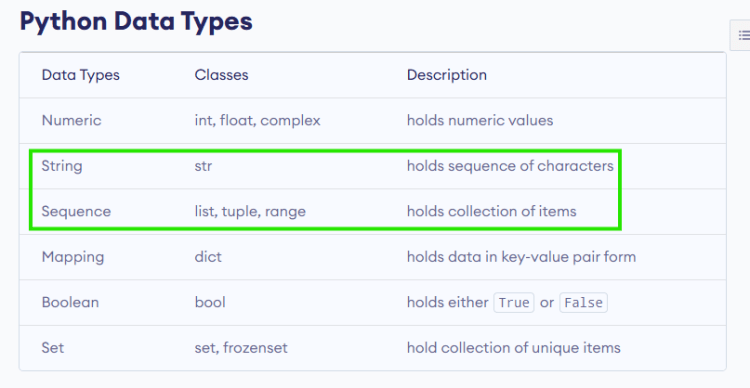
Sequence Types in Python
-
Types:
- string
- list
- tuple
- set
- range
-
accessing items in sequence
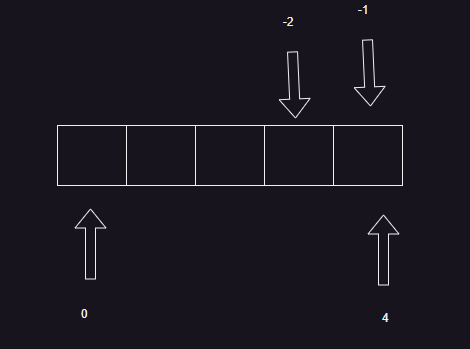
- slicing in python
- Sequence items can be looped using while but for is preferred to iterate each item. reference
- Refer Here for the samples done in the class


Problem:
- Print all the prime numbers between start and end
"""
primenumbers.py

This module contains code to print the prime numbers in a range
of values
"""

start = 10
end = 20

for number in range(start, end+1):
    # need to check if the number is prime or not
    is_prime_number = True
    for index in range(2,number):
        if number % index == 0:
            is_prime_number = False
            break
    if is_prime_number:
        print(number)
- Find largest prime factor using for and range
"""_summary_
"""
NUMBER = 13195
for factor in range(NUMBER-1,1,-1):
    # from 13194 to 2 find factors
    if NUMBER % factor == 0:
        # check if this factor is prime or not
        is_prime = True
        for index in range(2,factor):
            if factor % index == 0:
                is_prime = False
                break
        # if it is prime print and exit
        if is_prime:
            print(factor)
            break
Function
- This is a reusable code which can take arguments and return a value
- Syntax
def <func-name>(arg1, arg2 ..):
   ...
   ...
   return ...
Example Function with Basic Docstring
def multiply_numbers(a, b):
    """Multiplies two numbers and returns the result.

    Args:
        a (int): The first number.
        b (int): The second number.

    Returns:
        int: The product of a and b.
    """
    return a * b
Explanation:
- Summary: A brief description of what the function does.
- Args: Lists the parameters with their types and descriptions.
- Returns: Describes the return type and what it represents.
Example Function with Optional Parameters
def greet(name, greeting="Hello"):
    """Greets a person with a specified greeting.

    Args:
        name (str): The name of the person to greet.
        greeting (str, optional): The greeting message. Defaults to "Hello".

    Returns:
        str: A greeting message for the person.
    """
    return f"{greeting}, {name}!"
Explanation:
- Optional Parameter: Shows how to document optional parameters with default values.
Example Function with Multiple Return Values
def divide_numbers(a, b):
    """Divides two numbers and returns the quotient and remainder.

    Args:
        a (int): The dividend.
        b (int): The divisor.

    Returns:
        tuple: A tuple containing the quotient and remainder.
    """
    return divmod(a, b)
Explanation:
- Tuple Return: Illustrates how to document functions that return multiple values in a tuple.
These examples illustrate how to structure function docstrings to provide clear and comprehensive documentation as per the Google Python Style Guide. Each section is clearly defined, making it easy for users to understand the function’s purpose, parameters, and return values.
Citations:
[1] https://gemseo.readthedocs.io/en/5.3.2/software/example_google_docstring.html
[2] https://iw3.math.rutgers.edu/solutions/example_google.html
[3] https://sphinxcontrib-napoleon.readthedocs.io/en/latest/example_google.html
[4] https://www.datacamp.com/tutorial/docstrings-python
[5] https://gist.github.com/redlotus/3bc387c2591e3e908c9b63b97b11d24e
[6] https://www.geeksforgeeks.org/python-docstrings/
- Functions names should be snake cased
- While debugging functions we have two elements
- calling function
- function definition: To get into function use step into
- arguments, default arguments, variable arguments
- lambda functions in python
- Refer Here for samples done in the class
Packages, Modules and Imports
In Python, the concepts of packages, modules, and functions are integral to structuring code in a modular and organized manner. Here’s an explanation of their relationships:
Packages
- Definition: A package is a directory that contains multiple modules and potentially sub-packages. It serves as a way to organize related modules under a single namespace.
- Structure: A package must contain an
__init__.pyfile, which can be empty or include initialization code for the package. This file allows Python to recognize the directory as a package. - Purpose: Packages help manage larger codebases by grouping related modules, making it easier to maintain and navigate through the code.
Modules
- Definition: A module is a single Python file (with a
.pyextension) that contains Python code, including functions, classes, and variables. - Usage: Modules can be imported into other modules or scripts using the
importstatement, allowing access to their functions and variables. - Example: If you have a file named
math_operations.py, it can define various functions likeadd()andsubtract(), which can then be imported and used in other scripts.
Functions
- Definition: A function is a block of reusable code that performs a specific task. Functions are defined within modules.
- Characteristics: Functions can take parameters and return values, enabling modularity and reusability in programming. They help encapsulate behavior that can be reused across different parts of an application.
- Example: In a module named
math_operations.py, you might define a function like this:
python

  def add(x, y):

      return x + y
Relationship Overview
- Hierarchy:
- Packages contain modules.
- Modules contain functions (and possibly classes).
- Usage:
- You can import an entire package or specific modules from it.
- Within those modules, you can call functions defined therein.
- Code Organization:
- Packages help organize related modules into a coherent structure.
- Modules allow for logical grouping of functions and variables, promoting code reuse.
Example Structure
Consider the following structure:
my_package/
    __init__.py
    math_operations.py
    string_operations.py
- Here,
my_packageis a package containing two modules:math_operationsandstring_operations. - Each module can define several functions:
math_operations.pymight haveadd()andsubtract().string_operations.pymight haveconcat()andsplit().
Importing Example
To use these functions in another script, you would do something like:
from my_package.math_operations import add

result = add(5, 3)  # Calls the add function from the math_operations module
print(result)  # Outputs: 8
This structure allows for clean organization of code while enabling easy access to functionality across different parts of your application.
Citations:
[1] https://www.sitepoint.com/python-modules-packages/
[2] https://betterprogramming.pub/from-functions-to-python-package-f8a3bba8bb6b?gi=d18555cb174c
[3] https://www.geeksforgeeks.org/python-modules/
[4] https://emeritus.org/in/learn/what-are-the-important-functions-modules-and-packages-in-python/
[5] https://www.shiksha.com/online-courses/articles/difference-between-module-and-package-in-python/
[6] https://realpython.com/python-modules-packages/


