Github Actions
Costs Involved
Free Model
- Gitub Actions is free in the following cases
- The repositories you use with actions are public
- The systems you execute action on are your own rather than GitHub provided ones
Paid Model
- Applicable for Private repositories
- There are two types of items you pay for Github Actions
- Storage
- Minutes
- Github Actions Plans
| Plan | storage | minutes (per month) |
|---|---|---|
| Github Free | 500 MB | 2000 |
| Github Pro | 1 GB | 3000 |
| Github Team | 2 GB | 3000 |
| Github Enterprise Cloud | 50 GB | 50000 |
- Minute multipliers
- OS
- Linux => 1
- Windows => 2
- macOs => 10
- OS
- Refer Here for pricing and Refer Here for feature comparision
Actions Flow Overview
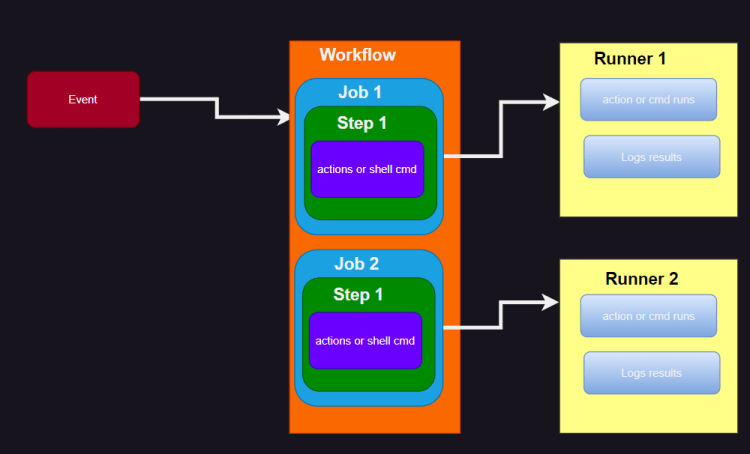
- At a highlevel
- Some triggering event happens in a GitHub Repository
- A dedicated directory in the repository (.github/workflows) is searched for workflow that is configured to respond to an trigger event
- Corresponding workflows are identified and runs are triggered
- Workflow is a key element over here (which is a CI/CD pipeline) which is coded in YAML format
- Workflows have a specific syntax
- A workflow contains one or more jobs. Each job can be simple or complex, once the workflow is kicked of it begins executing on a runner (machine on which Github actions execute)

Triggering Workflows
- Event Triggers Workflows
- An event can be defined in several ways
- A person does some operation on Github Repository
- A matching external trigger happens (an Event from outside of Github)
- A schedule is setup to run a workflow
- A workflow is initiated manually
- The workflow can respond to a single event such as when a push happens
on: push
- workflow can respond to multiple events
on:
  - push
  - pull_request
- Workflow can respond to multiple event types with qualifiers such as branches, tags or file paths
on:
  push:
    branches:
      - main
      - rel/v*
    tags:
      - v1.*
      - beta
    paths:
      - '**.ts'
- Workflow can execute on a specific interval
on:
  scheduled:
    - cron: '30 22 * * *'
- Workflow can respond to specific manual events or Comments on Github issues
- Refer Here for triggering
Components
Steps
- these are basic unit of executions
- They consist sof either invocations of predefined action or a shell command to be run on a runner
- Any shell command are executed via
runclause & any predefined action are pulled viausesclauses
steps:
  - uses: actions/checkout@v3
  - run: echo helloworld
Runners
- These are physical or virtual machines or containers where code workflow is executed.
- They can be system provided by you (Selfhosted runners) or hosted by Github
- we define with a simple
runs-onclause
runs-on: ubuntu-latest
Jobs
- Jobs aggregate steps and define which runner to execute them on
jobs:
  build:
    runs-on: ubuntu-latest
    steps:
      - uses: actions/checkout@v3
      - run: mvn clean package
Workflow
- A workflow is like a pipeline
name: Simple java build
on:
  push:
    branches:
      - main

jobs:
  build:
    runs-on: ubuntu-latest
    steps:
      - uses: actions/checkout@v3
      - run: mvn clean package
Figure out manual steps to
- build and run unit tests of java applications
- build and run unit tests of .net applications
- build and run unit tests of reactjs/angularjs applications
- build docker images
Building Java Applications
- To build java applications, we have two major options
- gradle
- maven
Building dotnet core applications
- Ensure dotnet core sdk is installed
- while building dotnet code we have two configurations
- Debug : used for dev environments
- Release: used for testing and production environments
- dotnet comes with
- build
- test
- package
Developer Environment setup for Github Actions
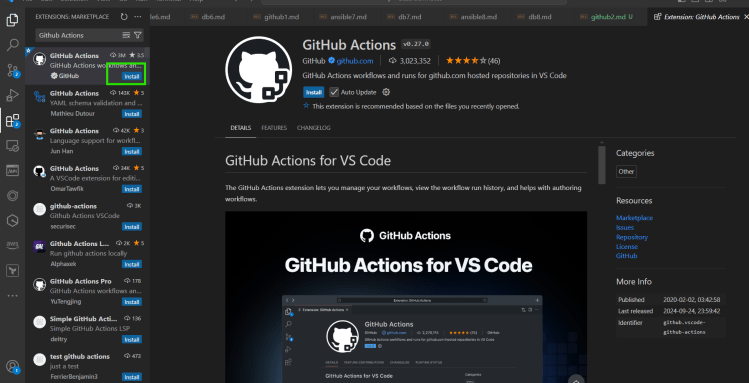
- Install Github actions extension on vscode