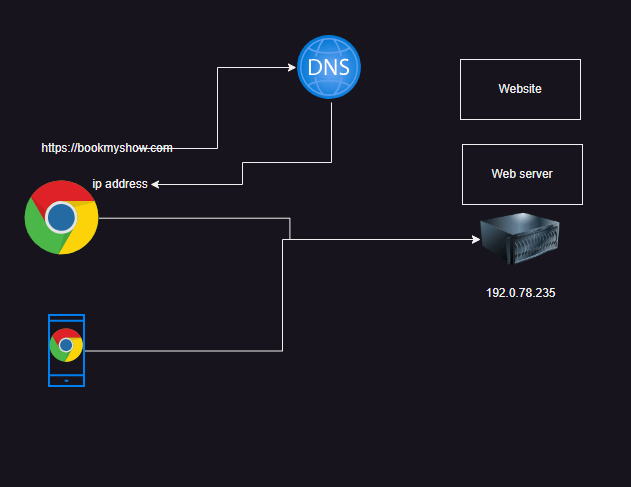
Web Applications are hosted on www and they respond to requests from browsers
Web Applications initially were only expected to serve html content i.e it was enough to create static pages. Techonology
html
css
javascript
(asp/javscript)
Then web applications were supposed to be interactive handling business logics such as ticket booking, online transfers, then the earlier technologies cannot handle this, then application servers started evolving.
java: j2ee, servlets, jsp, spring mvc
dotnet: asp.net
ruby: ruby on rails
php
python: django
nodejs
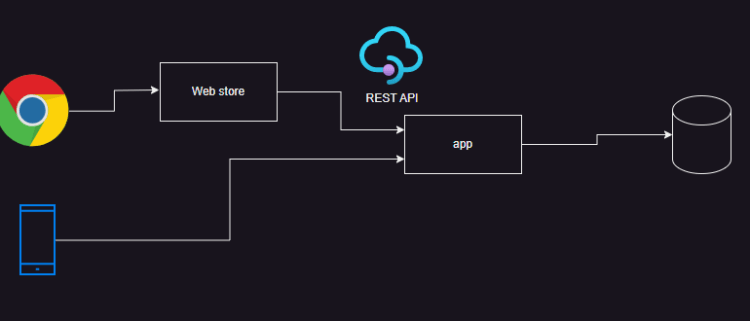
Then sepeartion of web and business logic was the next step
web layer (html):
vanila javascript
angular js
react js
vue js
app layer (business logic)
db layer
Then to individual scale and for easier deployments without having downtimes, microservices were introducted
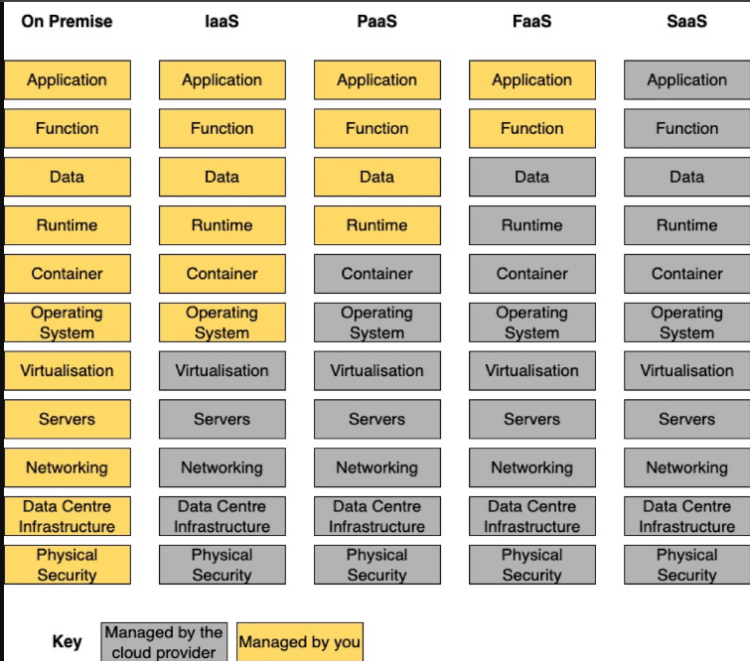
Hosting Platforms
Deploying python web apps or apis
Physical server
Virtual Servers (AWS/Azure/GCP/VmWare) (IaaS)
Platform as a Service (PaaS)
Container (Docker, Kuberentes)
To deploy web apis we can use serverless in addition to all of the above
REST API
HTTP is a popular protocol which responds to client request serving content
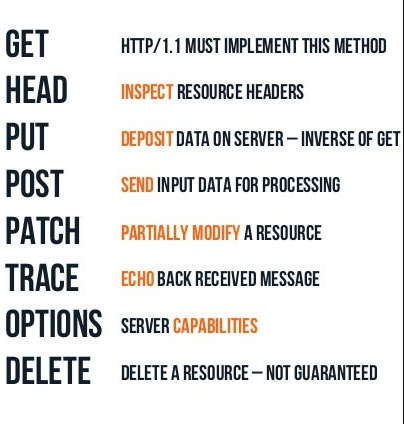
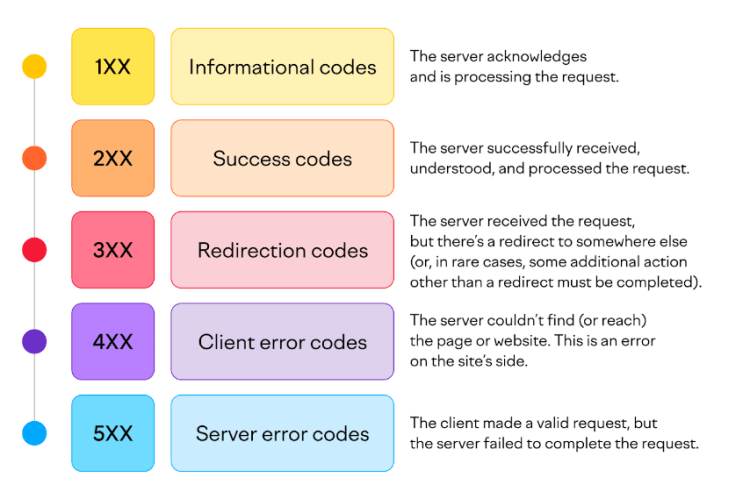
REST APIs use http for communications i.e they have status codes and http methods
REST API is an architectural style which introduces the concept of
Resources: This represents an object (Noun) and they can be accesed using URI (Uniform Resource Identifier)
Library Sample Rest API Design
Designing REST API methods for a library system involves defining the resources (like books, authors, and borrowers) and how clients can interact with them using standard HTTP methods like GET, POST, PUT, and DELETE.
Here’s a basic design for handling common operations in a library using REST API methods:
1. Books Resource
This will manage the list of books available in the library, including adding, viewing, updating, and deleting books.
Operation
HTTP Method
Endpoint
Description
Get a list of books
GET
/books
Retrieves all books in the library
Get a specific book
GET
/books/{id}
Retrieves a single book by its ID
Add a new book
POST
/books
Adds a new book to the library
Update a book
PUT
/books/{id}
Updates the details of an existing book by its ID
Delete a book
DELETE
/books/{id}
Removes a book from the library by its ID
Example:
GET /books: Fetch a list of all available books.
POST /books: Add a new book. The body might contain: json
{
"title": "To Kill a Mockingbird",
"author": "Harper Lee",
"isbn": "9780060935467",
"published_date": "1960-07-11"
}
2. Authors Resource
This will manage the authors of the books.
Operation
HTTP Method
Endpoint
Description
Get a list of authors
GET
/authors
Retrieves all authors in the library
Get a specific author
GET
/authors/{id}
Retrieves a single author by their ID
Add a new author
POST
/authors
Adds a new author to the system
Update an author
PUT
/authors/{id}
Updates the details of an existing author
Delete an author
DELETE
/authors/{id}
Deletes an author by their ID
Example:
GET /authors: Fetch a list of all authors.
POST /authors: Add a new author. The body might contain: json
{
"name": "Harper Lee",
"dob": "1926-04-28"
}
3. Borrowers Resource
This will handle library members who borrow books.
Operation
HTTP Method
Endpoint
Description
Get a list of borrowers
GET
/borrowers
Retrieves all borrowers registered in the system
Get a specific borrower
GET
/borrowers/{id}
Retrieves a borrower by their ID
Register a new borrower
POST
/borrowers
Registers a new borrower in the system
Update a borrower’s details
PUT
/borrowers/{id}
Updates the details of an existing borrower
Delete a borrower
DELETE
/borrowers/{id}
Deletes a borrower from the system
Example:
POST /borrowers: Register a new borrower. The body might contain: json
{
"name": "John Doe",
"email": "john.doe@example.com",
"membership_date": "2023-09-10"
}
4. Borrow/Return Books Resource
This will manage borrowing and returning books by borrowers.
Operation
HTTP Method
Endpoint
Description
Borrow a book
POST
/borrow/{book_id}/borrowers/{id}
Marks a book as borrowed by a specific borrower
Return a book
POST
/return/{book_id}/borrowers/{id}
Marks a book as returned by a borrower
Get borrowed books by user
GET
/borrowers/{id}/borrowed
Retrieves a list of books currently borrowed by the borrower
Example:
POST /borrow/123/borrowers/456: Borrower with ID 456 borrows the book with ID 123.
POST /return/123/borrowers/456: The borrower returns the book.
5. Categories or Genres Resource (Optional)
If you want to manage different categories/genres of books.
Operation
HTTP Method
Endpoint
Description
Get a list of genres
GET
/genres
Retrieves all book genres
Get books by genre
GET
/genres/{id}/books
Retrieves all books in a specific genre
Add a new genre
POST
/genres
Adds a new genre to the system
Delete a genre
DELETE
/genres/{id}
Deletes a genre from the system
Example:
GET /genres/1/books: Retrieve all books in genre 1 (e.g., Science Fiction).
REST API Summary for the Library:
Books: Add, view, update, and delete books.
Authors: Add, view, update, and delete authors.
Borrowers: Register, view, update, and delete library members.
Borrow/Return: Borrow or return books, track borrowing history.
Genres: Optionally manage and categorize books by genre.
This basic design gives flexibility to interact with the library system, handle book lending, and manage records, all via simple HTTP requests using REST principles.
Departmental store- REST API Design
Designing a REST API for a departmental store involves handling various resources such as products, categories, customers, orders, and payments. Below is a basic structure for each resource and how you might interact with them using REST API methods.
1. Products Resource
This resource manages the products available in the store, including viewing, adding, updating, and deleting products.
Operation
HTTP Method
Endpoint
Description
Get a list of products
GET
/products
Retrieves all products in the store
Get a specific product
GET
/products/{id}
Retrieves a single product by its ID
Add a new product
POST
/products
Adds a new product to the store
Update a product
PUT
/products/{id}
Updates an existing product’s details
Delete a product
DELETE
/products/{id}
Removes a product from the store
Example:
GET /products: Retrieves the list of all products.
POST /products: Adds a new product. The body might contain: json
{
"name": "Laptop",
"category_id": 1,
"price": 800,
"stock": 50
}
2. Categories Resource
This will manage the categories of products in the store (e.g., electronics, clothing).
Operation
HTTP Method
Endpoint
Description
Get a list of categories
GET
/categories
Retrieves all product categories
Get a specific category
GET
/categories/{id}
Retrieves a single category by its ID
Add a new category
POST
/categories
Adds a new category to the store
Update a category
PUT
/categories/{id}
Updates an existing category
Delete a category
DELETE
/categories/{id}
Removes a category from the store
Example:
GET /categories: Retrieves the list of all categories.
POST /categories: Adds a new category. The body might contain: json
{
"name": "Electronics"
}
3. Customers Resource
This resource handles the store’s customers, including creating customer profiles and managing their information.
Operation
HTTP Method
Endpoint
Description
Get a list of customers
GET
/customers
Retrieves all customers
Get a specific customer
GET
/customers/{id}
Retrieves a customer by their ID
Add a new customer
POST
/customers
Registers a new customer
Update customer details
PUT
/customers/{id}
Updates an existing customer’s details
Delete a customer
DELETE
/customers/{id}
Removes a customer from the store
Example:
POST /customers: Adds a new customer. The body might contain: json
{
"name": "John Doe",
"email": "john.doe@example.com",
"address": "123 Main St"
}
4. Orders Resource
This resource manages customer orders, tracking products that have been purchased, their status, and the customer who placed the order.
Operation
HTTP Method
Endpoint
Description
Get a list of orders
GET
/orders
Retrieves all orders placed by customers
Get a specific order
GET
/orders/{id}
Retrieves details of a specific order
Create a new order
POST
/orders
Places a new order
Update an order status
PUT
/orders/{id}
Updates the status of an order (e.g., shipped, delivered)
Delete an order
DELETE
/orders/{id}
Cancels an order
Example:
POST /orders: Creates a new order. The body might contain: json
{
"customer_id": 123,
"order_items": [
{
"product_id": 1,
"quantity": 2
},
{
"product_id": 3,
"quantity": 1
}
],
"total_price": 500,
"status": "pending"
}
5. Payments Resource
This resource manages payments for orders, tracking the payment status.
Operation
HTTP Method
Endpoint
Description
Get payment details
GET
/payments/{order_id}
Retrieves the payment status for a specific order
Make a payment
POST
/payments
Makes a payment for an order
Update payment status
PUT
/payments/{id}
Updates the payment status (e.g., paid, refunded)
Example:
POST /payments: Creates a payment for an order. The body might contain: json
{
"order_id": 123,
"payment_method": "credit_card",
"amount": 500,
"status": "paid"
}
6. Cart Resource
This resource manages customer shopping carts, allowing them to add, view, and remove items before placing an order.
Operation
HTTP Method
Endpoint
Description
View cart items
GET
/cart/{customer_id}
Retrieves all items in a customer’s cart
Add item to cart
POST
/cart/{customer_id}
Adds an item to the customer’s cart
Remove item from cart
DELETE
/cart/{customer_id}/items/{item_id}
Removes an item from the cart
Example:
POST /cart/123: Adds an item to the cart for customer 123. The body might contain: json
{
"product_id": 1,
"quantity": 2
}
7. Inventory Resource
This resource handles the stock and availability of products in the store.
Operation
HTTP Method
Endpoint
Description
Get current stock for a product
GET
/inventory/{product_id}
Retrieves the stock level for a specific product
Update stock for a product
PUT
/inventory/{product_id}
Updates the stock level for a product
Example:
PUT /inventory/1: Updates the stock for product 1. The body might contain: json
{
"stock": 100
}
REST API Summary for Departmental Store:
Products: Add, view, update, and delete products.
Categories: Manage product categories.
Customers: Add, view, update, and delete customer profiles.
Orders: Create, view, update, and delete orders.
Payments: Handle payments for orders.
Cart: Manage the customer’s shopping cart before placing an order.
Inventory: Track and update the stock of products.
This design provides a flexible and structured way to manage the various operations of a departmental store using REST API methods.
Developing REST APIs in Python
To develop rest api’s in python we have following frameworks which make it simple
This will manage the list of books available in the library, including adding, viewing, updating, and deleting books.
Operation
HTTP Method
Endpoint
Description
Get a list of books
GET
/books
Retrieves all books in the library
Get a specific book
GET
/books/{id}
Retrieves a single book by its ID
Add a new book
POST
/books
Adds a new book to the library
Update a book
PUT
/books/{id}
Updates the details of an existing book by its ID
Delete a book
DELETE
/books/{id}
Removes a book from the library by its ID
Example:
GET /books: Fetch a list of all available books.
POST /books: Add a new book. The body might contain: json
{
"title": "To Kill a Mockingbird",
"author": "Harper Lee",
"isbn": "9780060935467",
"published_date": "1960-07-11"
}