Docker Continued
-
Inside the container, applications get
- cpu cycles
- RAM
- Disk space
- process tree
- network
-
So applications have all of the things necessary to be executed, so they work in containers as they work in vm’s or physical system
-
Container can be defined as an isolate area created on the system with
- cpu
- RAM
- Disk /filesystem
- process tree
- network (ip address)
- thin layer of os
-
To create a container docker needs an Image.
-
Initial Responsibilities of DevOps Engineer
- Creating Docker Images for the applications developed
- Sharing Docker Images with the servers where the application has to be deployed
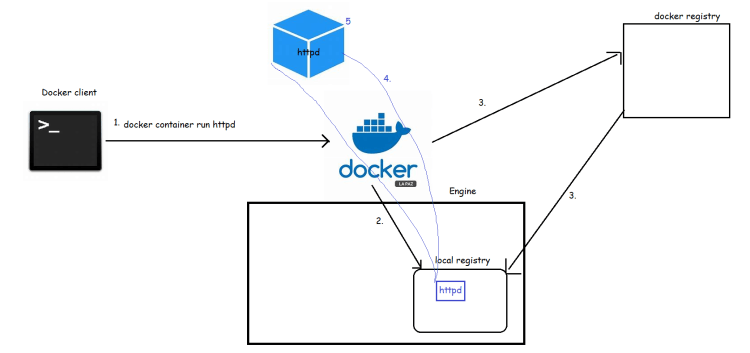
Docker Simplified Architecture
- When we install Docker on any system, we get two major components
- Docker client
- Docker daemon (Docker Engine)
- When we want to run an application, we need to create a contianer, lets see the process in the following steps
- Steps when we try to create docker container:
- request made from docker client to create httpd container reaches the docker engine
- docker engine searches the httpd image locally
- Since the image is not present docker engine tries to download the image (pull) from docker registry. Default docker registry is dockerhub
- Once the image is pulled, docker engine creates the container from the local image pulled/downloaded
- The container will get a
- container id
- container name
- some cpu/memory
- an ip address
- filesytem from docker image