

AWS EC2 Instance Types
- When we launch an ec2 instance , the instance type used determines the harware of the host computer & each instance type offers different compute, memory and storage capabilities

- Every instance type belongs to a instance series. Each instance series has a different hardware specs and instance series are categorized into instance families

| Instance Family | Description | Instance Series List |
|---|---|---|
| General purpose | General purpose instances provide balance of compute, memory & networking resources | A1, M4, M5zn, M5n, M5a, M5, M6g, T2, T3a, T3, MAC |
| Compute Optimizied | Ideal for compute bound applications | C4, C5n, C5, C6g, C6gd, C6gn |
| Memory Optimized | Designed to deliver fast perf for workloads that process large datasets in memory | R5,R5a, R5b, R5n, R6g,R6gd, X1, X1e, X2gd, z1d |
| Storage Optimized | designed for workloads that require high read & write access to very large data sets on local storage | D2, D3, D3en, H1,I3,I3en |
| Accelarated computing | Uses hardware accelarators, co-procesors to perform graphical processing, data pattern matching etc | F1, G3, G4ad, G4dn, P1,P2,P3 |
- For instance types Refer Here
- Each instance series will have different instance types to specify the cpu, memory, storage speed and network speed.
- Creating an ec2 instance and configuring differnt aspects

- Exercise: Create a redhat linux 8 os with 1 cpu and 1 GB of RAM and 15 GB of disk space. Ensure this machine is open to communicate on port 80,22, 9200, 5601. This machine should be in the zone us-west-2b (Oregon)
- AMI => redhat 8
- 1 cpu and 1 Gb of RAM => t2.micro
- Zone => us-west-2b

- Steps


- Once the instance is launched, login into the instance and verify disk sizes


- Now we want our machine to have 1 VCPU and 2 GB of RAM, we need to change the instance type from t2.micro to t2.small
- Change instance type is disabled

- Lets shutdown the ec2 instance and change instance type


- Now start the instance and login into ec2 instance
- Install htop Refer Here

- Install htop Refer Here
- Change instance type is disabled
- AWS EC2 instance lifecycle:
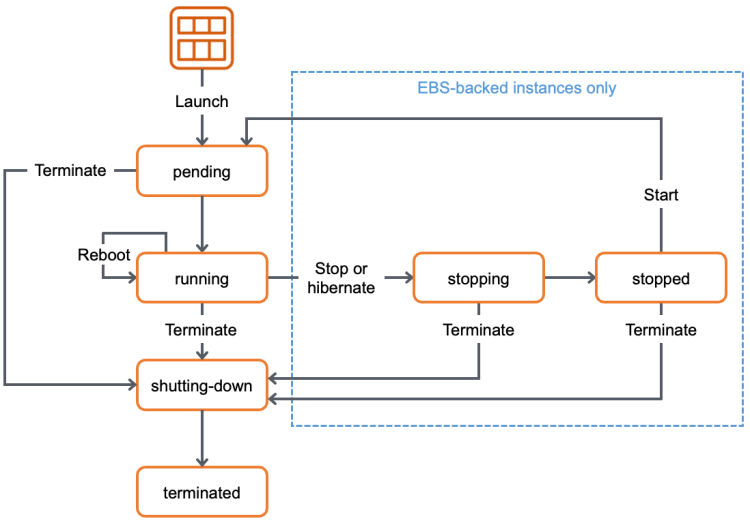
- AWS EC2 instances states and the billing:
- In AWS we get charge for ec2 instance and the disk (EBS Volume)
- Instance state will have impact on ec2 instance state (Ondemand instances)

- The ec2 instance which we are using right now are called as on-demand instances, Lets understand the billing of on-demand instances Refer Here
- The ec2 instance pricing is effected by
- region
- instance type


Instance Purchasing Options
-
AWS EC2 provides the following options to enable us to optimize the costs based on our needs
- On-Demand Instances
- Savings Plan
- Reserved Instances
- Spot Instances
- Dedicated Hosts
- Dedicated Instances
- Capacity Reservations


