

GCE VM Instance Life Cycle
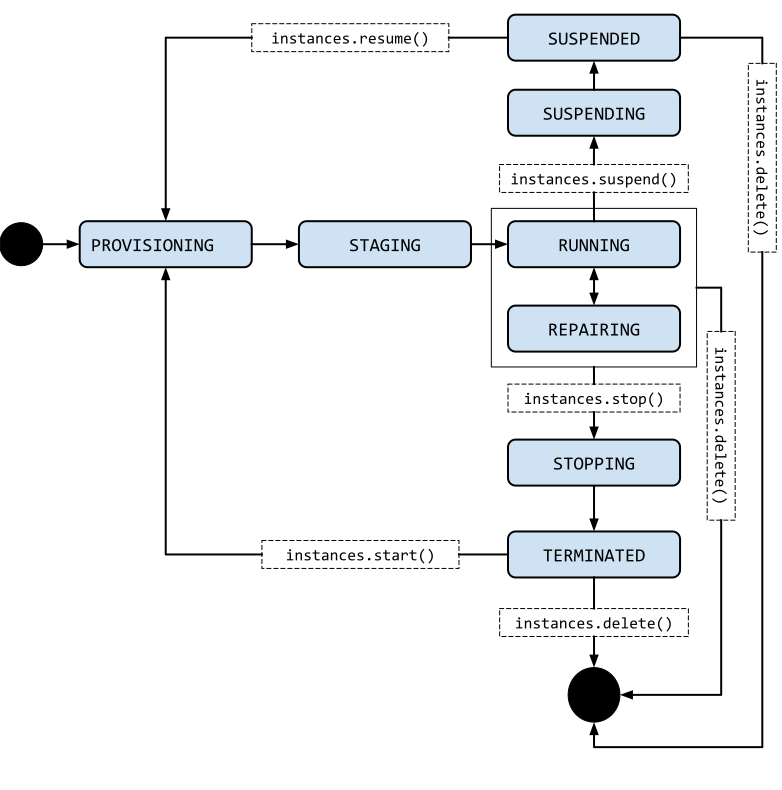
- The below image describes the instance life cylce
- Lets create a free tier vm instance

- Now lets stop the vm instance

- Refer Here to understand states of the GCP VM Instance
- Start the vm and navigate to gcloud cli


gcloud compute instances describe 'instance-1' --zone 'us-central1-a'
- Now lets stop the instance
gcloud compute instances stop 'instance-1' --zone='us-central1-a'
gcloud compute instances describe 'instance-1' --zone us-central1-a


- Now lets start the vm again and suspend and describe status
gcloud compute instances start 'instance-1' --zone='us-central1-a'
gcloud beta compute instances suspend 'instance-1' --zone='us-central1-a'
gcloud compute instances describe 'instance-1' --zone us-central1-a


GCE Machine Types
- Machine type is set of virtualized hardware resources available to vm instance
- Each Machine type family includes different machines types.
- VM Istance Machine family types are
- General Purpose Machine types
- This offers balanced price-performance ratio
- E2
- N2
- N2D
- N1
- Memory Optimized Machine types
- Compute Optimized Machine types
- Accelarator optimized machine types
- Shared-core machine types.
- General Purpose Machine types
- Refer Here for recommendations on machine types
- If you want to know about underlying CPU platforms which GCP uses Refer Here


