

AWS Cloudformation Template Anatomy
- FormatVersion:
- This is optional field
- Refer Here
- Description
- Add your description about the template
- This is an optional field
- Refer Here
- Resources:
- This section will consist of resources which you want to create in a declarative fashion
- This is required field
- Refer Here
- Individual resource syntax is
"resourceName": {
            "Description": "-",
            "Type": "-",
            "Properties": "-"
        }
Lets start helping john
-
Lets see at the architecture
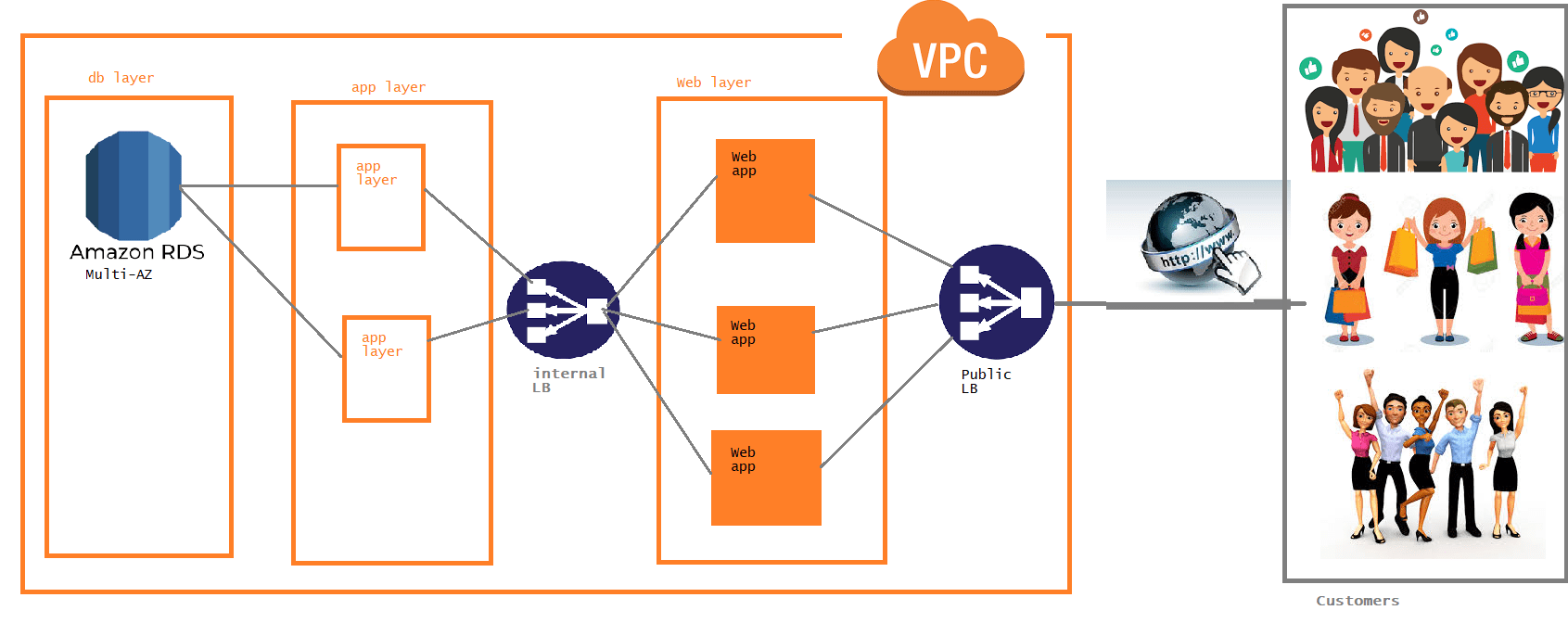
-
Lets go in step by step approach for building a template, Lets start building the vpc
- Try to create vpc manually to understand options


- Now since we want to create a vpc lets start from basic skeleton
{ "AWSTemplateFormatVersion" : "2010-09-09", "Description": "Trying to help john realize the ntier architecture", "Resources": { } }- Now lets add a resource vpc , so lets google for aws vpc cloudformation


- Now lets fill the values
{ "AWSTemplateFormatVersion": "2010-09-09", "Description": "Trying to help john realize the ntier architecture", "Resources": { "ntiervpc": { "Type": "AWS::EC2::VPC", "Properties": { "CidrBlock": "192.168.0.0/16", "EnableDnsSupport": true, "EnableDnsHostnames": true, "Tags": [ { "Key": "Name", "Value": "fromcf" } ] } } } }- Lets create a cf stack


- Since we have network now lets try to add subnets, make a note of manual options

- Now lets write resource, While create a subnet resource we need vpc id, To get any id’s AWS CF Resources support Return values. To get ids we generally use ref function Refer Here

- As of now our file looks as shown below
{ "AWSTemplateFormatVersion": "2010-09-09", "Description": "Trying to help john realize the ntier architecture", "Resources": { "ntiervpc": { "Type": "AWS::EC2::VPC", "Properties": { "CidrBlock": "192.168.0.0/16", "EnableDnsSupport": true, "EnableDnsHostnames": true, "Tags": [ { "Key": "Name", "Value": "fromcf" } ] } }, "websubnet": { "Type": "AWS::EC2::Subnet", "Properties": { "AvailabilityZone": "ap-south-1a", "VpcId": { "Ref": "ntiervpc" }, "CidrBlock": "192.168.0.0/24", "Tags": [ { "Key": "Name", "Value": "fromcf-web1" } ] } } } }- Now lets update the stack to create a subnet


- Now lets create two more subnets and update stack
{
    "AWSTemplateFormatVersion": "2010-09-09",
    "Description": "Trying to help john realize the ntier architecture",
    "Resources": {
        "ntiervpc": {
            "Type": "AWS::EC2::VPC",
            "Properties": {
                "CidrBlock": "192.168.0.0/16",
                "EnableDnsSupport": true,
                "EnableDnsHostnames": true,
                "Tags": [
                    {
                        "Key": "Name",
                        "Value": "fromcf"
                    }
                ]
            }
        },
        "websubnet": {
            "Type": "AWS::EC2::Subnet",
            "Properties": {
                "AvailabilityZone": "ap-south-1a",
                "VpcId": {
                    "Ref": "ntiervpc"
                },
                "CidrBlock": "192.168.0.0/24",
                "Tags": [
                    {
                        "Key": "Name",
                        "Value": "fromcf-web1"
                    }
                ]
            }
        },
        "appsubnet": {
            "Type": "AWS::EC2::Subnet",
            "Properties": {
                "AvailabilityZone": "ap-south-1b",
                "VpcId": {
                    "Ref": "ntiervpc"
                },
                "CidrBlock": "192.168.1.0/24",
                "Tags": [
                    {
                        "Key": "Name",
                        "Value": "fromcf-app1"
                    }
                ]
            }
        },
        "dbsubnet": {
            "Type": "AWS::EC2::Subnet",
            "Properties": {
                "AvailabilityZone": "ap-south-1a",
                "VpcId": {
                    "Ref": "ntiervpc"
                },
                "CidrBlock": "192.168.3.0/24",
                "Tags": [
                    {
                        "Key": "Name",
                        "Value": "fromcf-db1"
                    }
                ]
            }
        }
    }
}
- Try to create vpc manually to understand options
-
Cloud formation templates are supposed to be reusable. Is the above template reusable.
- This template can be used to create a vpc in mumbai region with 3 subnets with fixed ip ranges and names
-
So lets make our template flexible by adding an option to the user to enter parameters just like what we did in lampstack. Refer the parameters given in lampstack in below image
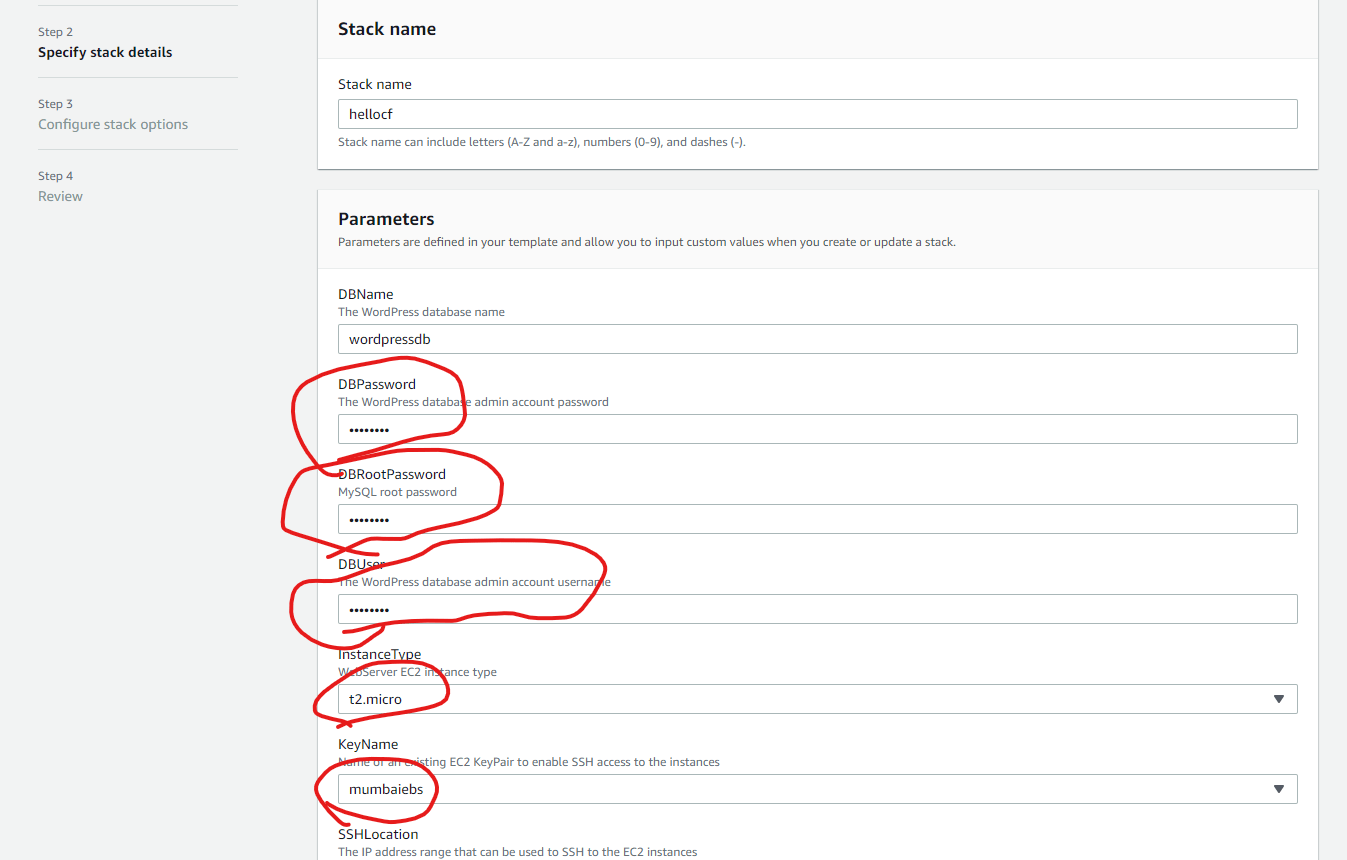
-
To add the parameters lets Refer Here
-
After adding few paramters


{
    "AWSTemplateFormatVersion": "2010-09-09",
    "Description": "Trying to help john realize the ntier architecture",
    "Parameters": {
        "vpcname": {
            "Description": "Enter the name of your vpc",
            "Type": "String",
            "Default": "fromcf"
        },
        "vpccidrrage": {
            "Description": "Enter the cidr range of vpc",
            "Type": "String",
            "Default": "192.168.0.0/16"
        },
        "websubnetrange": {
            "Description": "Enter the cidr range of web subnet",
            "Type": "String",
            "Default": "192.168.0.0/24"
        },
        "appsubnetrange": {
            "Description": "Enter the cidr range of app subnet",
            "Type": "String",
            "Default": "192.168.1.0/24"
        },
        "dbsubnetrange": {
            "Description": "Enter the cidr range of db subnet",
            "Type": "String",
            "Default": "192.168.2.0/24"
        }
    },
    "Resources": {
        "ntiervpc": {
            "Type": "AWS::EC2::VPC",
            "Properties": {
                "CidrBlock": {
                    "Ref": "vpccidrrage"
                },
                "EnableDnsSupport": true,
                "EnableDnsHostnames": true,
                "Tags": [
                    {
                        "Key": "Name",
                        "Value": {
                            "Ref": "vpcname"
                        }
                    }
                ]
            }
        },
        "websubnet": {
            "Type": "AWS::EC2::Subnet",
            "Properties": {
                "AvailabilityZone": "ap-south-1a",
                "VpcId": {
                    "Ref": "ntiervpc"
                },
                "CidrBlock": {
                    "Ref": "websubnetrange"
                },
                "Tags": [
                    {
                        "Key": "Name",
                        "Value": "fromcf-web1"
                    }
                ]
            }
        },
        "appsubnet": {
            "Type": "AWS::EC2::Subnet",
            "Properties": {
                "AvailabilityZone": "ap-south-1b",
                "VpcId": {
                    "Ref": "ntiervpc"
                },
                "CidrBlock": {
                    "Ref": "appsubnetrange"
                },
                "Tags": [
                    {
                        "Key": "Name",
                        "Value": "fromcf-app1"
                    }
                ]
            }
        },
        "dbsubnet": {
            "Type": "AWS::EC2::Subnet",
            "Properties": {
                "AvailabilityZone": "ap-south-1a",
                "VpcId": {
                    "Ref": "ntiervpc"
                },
                "CidrBlock": {
                    "Ref": "dbsubnetrange"
                },
                "Tags": [
                    {
                        "Key": "Name",
                        "Value": "fromcf-db1"
                    }
                ]
            }
        }
    }
}


Cloudformation workflow
- Upload the created template from local/s3 bucket and cf saves this template
- Now cloudformation parses this template to create stack which collection of resources defined in CF Template


