

Containers in Storage Accounts
-
Containers hold blob data
-
Create a container & Upload Some file (block blob)


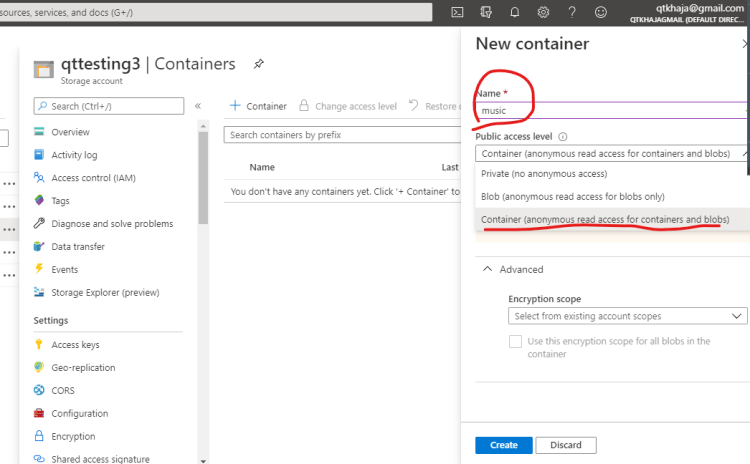


-
Every container will have public access level
- private:
- Not accessible over internet
- Can be accessed only within azure
- For creating, deleting or editing, viewing the blob you should sign in into azure (Authenticated & Authorized to Azure Storage accounts)
- Blob:
- Anonymous read access to the outside world at the blob level
- Access (viewing) => Anyone
- For creating, deleting or editing the blob you should sign in into azure (Authenticated & Authorized to Azure Storage accounts)
- Container:
- Anonymous read access to outside world (any one) at the container level
- Access (viewing) => Anyone
- For creating, deleting or editing the blob you should sign in into azure (Authenticated & Authorized to Azure Storage accounts)
- private:
-
Lets observe how to create un managed disks
-
For this activity create two storage accounts
- GPLv2 with Premium Tier

- GPLv2 with Standard Tier

- GPLv2 with Premium Tier
-
Lets try to create one VM with premium disk and change the disk options to un managed. In the disks tab select the options as shown below


-
Lets try to create one more VM with standard disk and change the disk options to un managed. In the disks tab select the options as shown below


-
Navigate to the disks blade on premium unmanaged disk based vm

-
lets look at premium storage account linked to the above & see what is created


-
Now repeat the same steps for standard storage based vm
-
When we select unmanaged disk for creating a vm, In the selected storage account
- A container name as vhds is getting created with private access level
- In side this container a page blob for the disk is created.


