

AWS EC2 Concepts (Contd..)
- AWS is by default a multi tenant environment


Instance Types
-
When we launch an ec2 instance we can choose instance type, so to to simplify amazon categorizes instances into different purpose
-
Categorization by purpose
-
General Purpose:
- Provide a balance of compute, memory and networking resources.
- Under General Purpose Amazon has different Instance Types and Sizes
- Instance Types under General Purpose are
- A1
- M5 & M5a
- M6g and M6gd
- T2, T3 and T3a
-
Compute Optimized:
- Are ideal for compute-bound applications, they generally have high cpu to memory ratio
-
Memory Optimized:
- Are designed to deliver faster performance for workloads that process large data in memory, They have high memory to cpu ratio.
-
Storage Optimized:
- Are designed for workloads that require high, read and write speeds on local storage.
-
Accelerated Computing
- Here we have GPU (Graphical processing units) & FPGA (Field Programmable Gate Arrays)
-
-
For every instance type we will have sizes, these sizes determine
- vcpus
- memory
- Network Speed


Instance Life cycle
- Instance Life cycle States
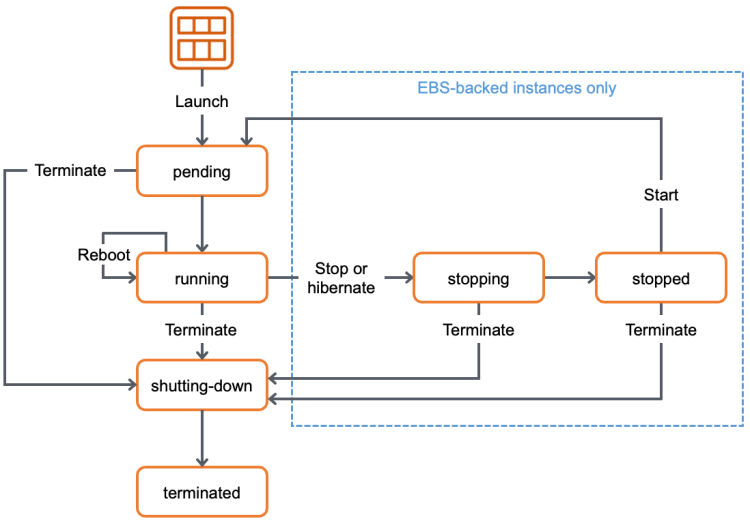
- Instance state:
- Pending: Ec2 instance is preparing to enter the running state. Instance usage will not be billed.
- running: The instance is running & ready for use. Instance usage will be billed.
- stopping: When you are Stop-Hibernating Instance usage will be billed, if your are stopping, you will not be billed
- stopped: not billed
- shutting down : not billed
- Terminate: ec2 instance is permanently deleted and not billed
- AWS EC2 instance will have the following which are charged
- Instance
- Hard disk
- AMI (Third party AMIs)
- Any AWS Service may have different pricing across regions (Slightly different prices) Refer Here


- In EC2 instance depending on which OS you use in AMI, there might be slight differences in pricing

- Some AMI’s from market place will have software costs


Instance Purchasing Options
- EC2 provides the following purchasing options to optimize your costs based on your needs
- On-Demand instances
- Savings Plan
- Reserved Instances
- Scheduled Instances
- Spot Instances
- Dedicated Hosts
- Dedicated Instances
- Capacity Reservations
On-Demand instances
- On-Demand instances will have no long term commitments, It is default Purchasing OPtion for ec2 instances. You pay for what you use.
- You have full control over instance lifecycle.
- On-Demand Instances lets you pay for the compute capacity by the hour or second (minimum of 60 seconds) with no long-term commitments.


