

Networking contd..
- Answer to previous class question
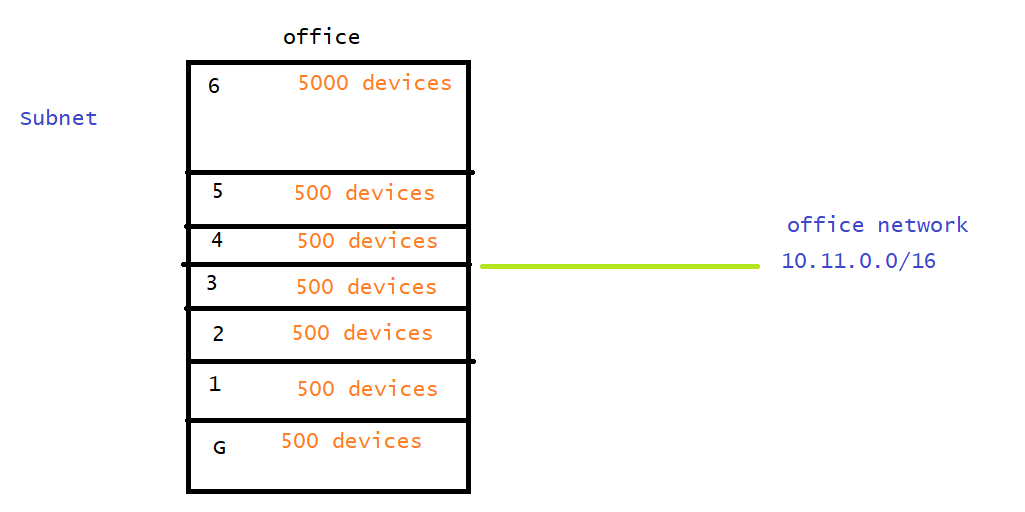

10.11.0000000   0.00000000

10.11.0.0/23 G

10.11.0000001   0.00000000
255.255.254.0
10.11.2.0/23 F
10.11.4.0/23 S
10.11.6.0/23 3
10.11.8.0/23 4
10.11.0000101   0.00000000
10.11.10.0/23 5
10.11.00100000.00000000
10.11.32.0/19
255.255.224.0
- When we create a subnet we have two ipaddress which are reserved (networkid and broadcast address), when we create a subnet in AWS
- x.x.x.0 => Network address
- x.x.x.1 => Reseved by AWS for the vpc router
- x.x.x.2 => Reserved by AWS for the DNS server
- x.x.x.3 => Reserved by AWS for future usage
- x.x.x.255 => Broadcast address
- First four ip address and last ip address (total 5) are reserved. IN AWS the formula for the host size is 2^n-5
Lets create a VPC in AWS
- In AWS VPC is created at the Region level and subnets are scoped at AZ level

- Regions in AWS will have a code in the pattern of <cont>-<direction>-<number> eg
us-west-2, ap-south-1and AZ will have code of <region><a-z> egus-west-2a,us-west-2b,us-west-2c - Navigate to aws console Refer Here


- Every AWS Region will have a Default VPC
- Now lets create our vpc


- Generally when we create a network, we might need router, In AWS router is called as route table. Whenever we create a vpc a default rotue table (router) is created. It will have following rules
- All the traffic with in vpc is allowed i.e. all devices in subnets can communicate with each other

- All the traffic with in vpc is allowed i.e. all devices in subnets can communicate with each other
- Network (VPC) which we created logically looks as shown below

- To enable internet connectivity (dual) to your vpc, we need to create internet gateway


- Current state logically looks as shown below

- To get internet to our subnets, we need to establish route table routes to internet gateway


Next steps
- Create route table rules for internet connectivity?
- What are public and private subnets?
- How do my private subnets connect to internet?
- How can i communicate across different vpc’s


