

Kubernetes Master


- Kubernetes master runs on Linux nodes
Master Components
kube-apiserver
- This component is Central to Kubernetes. All communications between all components goes through the kube-apiserver
- This component is frontend of the Kubernetes control plane.
- This component exposes a REST API.
- We would interact with this component using kubectl by using the YAML files, which are also referred as manifests
etcd
- etcd stores the entire configuration and the state of the cluster.
- etcd is consistent and highly available distributed key-value store.
kube-scheduler
- It watches for new work tasks and assigns them to healthy nodes in the cluster
Controller-Manager
- It is responsible for maintaining desired states mentioned in the manifest.
- It looks like single component, but with in it has
- Node Controller: for noticing & responding when node goes down
- Replication Controller: for maintaining the correct number of pods for every replication controller object.
- Endpoints Controller: Populates the Endpoints object
Cloud-Controller-manager
- If you run the Kubernetes on a supported cloud platform such as AWS, Azure or Google, your control plane runs the Cloud-Controller-Manager.
- It is responsible for underlying cloud specific controllers.
Node Components
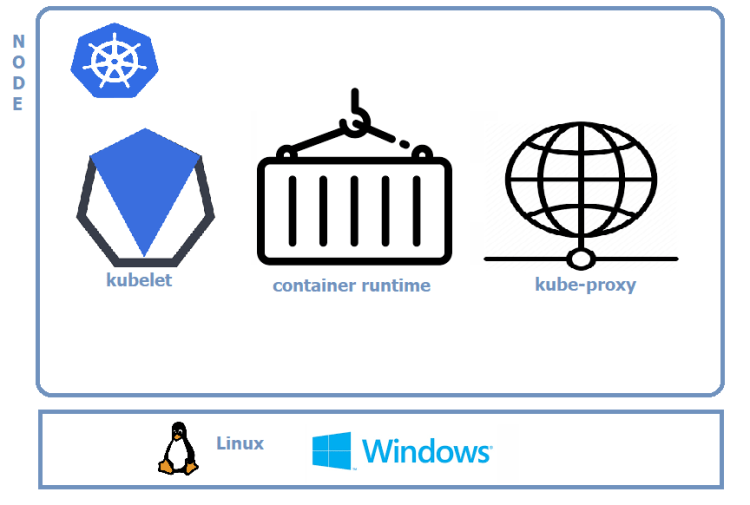
kubelet
- This is an agent which runs on each node in the cluster.
- It watches for the instructions from API Server for new work assignments.
- If it can’t run the task assigned, it reports back to master and lets control plane decide on the actions.
- It is responsible for the node registration process
Container Runtime
- This is software which is responsible for running containers.
- Some of them are Docker, containerd, cri-o, rktlet
kube-proxy
- Maintains the network rules on nodes
- This is responsible for networking on nodes.
Cluster DNS
- Every Kubernetes Cluster has an internal DNS service
- This has static IP address that is hardcoded into every Pod on the cluster i.e. all Pods now how to find the DNS Server
- Services, Stateful Sets and Pods are registered with Cluster DNS.
- Cluster DNS is based on CoreDNS
Interesting ADD ONS
Web UI (Dashboard)


- Web based Kubernetes user interface
- Capabilities:
- Deployment
- View cluster resources
- Troubleshooting
Container Resource Monitoring
- We will discuss about it in next series of articles
Cluster Level Logging
- We will discuss about it in next series of articles
How to Package Apps To Run on Kubernetes


- Package your application as container image.
- We would create a Image for the application
- Push the image to Docker Registry
- Pod will Wrap container
- Pod is deployed into Kubernetes cluster via Declarative Manifest file.


