

Migration Story


- Organization ‘ASquarezone’ has applications running on-premise and they want to run the applications/workloads from aws
- Teams
- RAM and Team:
- Maintain the IT, Backups and all the other infra in the on-premise Datacenters
- Responsible for all the maintenance activities
- John:
- Architect who has to design migration
- Steve and Team:
- Cloud Engineers who will implement the migration as designed by John
- RAM and Team:
- John’s Responsibilities:
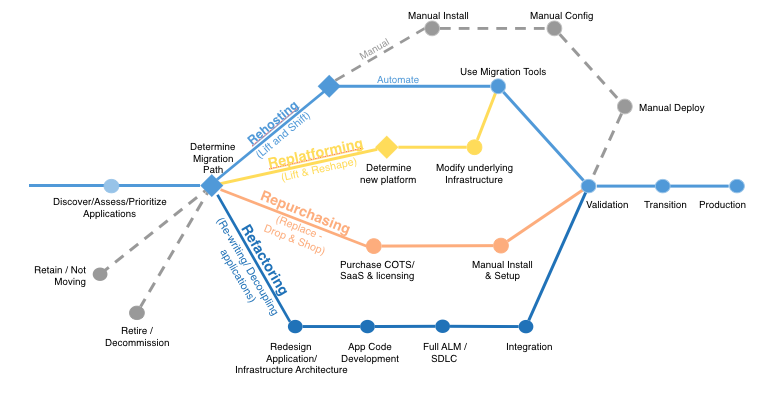
- Understand 6R’s of migration and need to come up with the Migration approach
- Steve’s Responsibilities:
- Implement Migration
- What will we learn
- Virtual Machines to AWS (V2V)
- Databases to AWS
- Possibilities for migrating the Physical machine to AWS
- AWS Services:
- Service Migration Service
- Database Migration Service
6R’s of Migration
- Refer Here
- Rehosting (lift and shift)
- Replatforming (lift, tinker and shift)
- Rearchitect/Refactor (rewriting)
- Retain
- Retire
- Repurchase

Labsetup: Simulate the Migration
- HyperV to AWS
- To simulate HyperV Server, since we dont have physical hyper v servers, lets create hyperv server and 3 vms in azure
- Vmware Vsphere to AWS (Physical setup)


Creating HyperV Server on Azure and creating virtual machines
- For creating Hyper V Server on Azure

- Install chocolatey
- Complete the Steps from here

choco install googlechrome -y
choco install vagrant -y
choco install git -y
- restart the virtual machine and login into powershell
vagrant box add centos/7
cd c:\
mkdir onpremise
cd onpremise\
mkdir tomcat
mkdir apache
mkdir iis
cd tomcat
vagrant
- Create a virtual machine using vagrant in apache folder
cd C:\onpremise\apache
vagrant init centos/7
vagrant up
vagrant ssh
sudo yum install httpd -y
sudo systemctl enable httpd.service
sudo systemctl start httpd.service
- Create a virtual machine using vagrant in tomcat folder
cd C:\onpremise\tomcat
vagrant init centos/7
vagrant up
vagrant ssh
sudo yum install tomcat -y
sudo systemctl enable tomcat.service
sudo systemctl start tomcat.service


